Hunter Ceiling Fans

  • Home
  • Hunter Manuals
  • Hunter Fan Parts
    • Hunter Ceiling Fan Remotes
    • Hunter Ceiling Fan Light Kits
    • Hunter Ceiling Fan Blade Arms
    • Hunter Ceiling Fan Blades
    • Hunter Ceiling Fan Downrods
    • Hunter Ceiling Fan Pull Chains
    • Hunter Ceiling Fan Wall Controls
    • Hunter Ceiling Fans Replacement Globes
  • Hunter Support
  • Hunter Commercial Ceiling Fans

Hunter Remote 85095 Replacement

April 29, 2025 by admin Leave a Comment

If you’re in need of a Hunter Remote 85095 replacement, you’ve come to the right place. Whether your current remote has stopped working, you need a spare, or you’re upgrading your system, this guide will walk you through everything you need to know about finding, purchasing, and replacing the Hunter 85095 remote control.
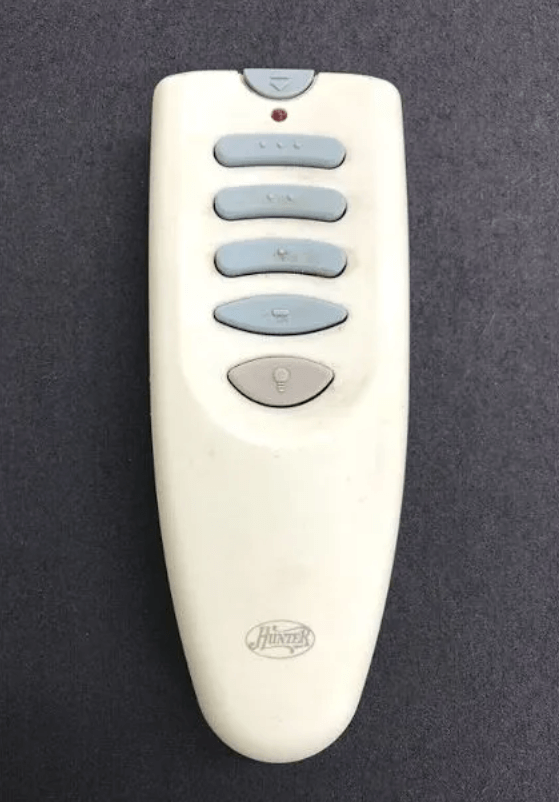
Hunter 85095 Ceiling Fan Remote Control

1. Where to Find the Hunter Remote 85095 Replacement

Finding the right replacement remote for your Hunter ceiling fan is easy and convenient. Here are the best places to purchase the Hunter Remote 85095:

Option 1: Purchase from Amazon

To purchase the Hunter Remote 85095 replacement with the ease of free returns and fast shipping, check out Amazon: Buy Hunter Remote 85095 on Amazon (affiliate link)

This is a great option for getting your remote delivered quickly, with the assurance of customer reviews and product compatibility.

Option 2: Hunter Fan Official Website

For direct purchases, you can go through the Hunter ceiling fans website. While the product availability may vary, this is the official source for Hunter ceiling fan parts and remotes.

Option 3: Other Retailers

Retailers like Home Depot, Lowe’s, or trusted third-party websites may also carry the Hunter Remote 85095. Always ensure compatibility before purchasing to avoid returns.

2. How to Install the Hunter Remote 85095 Replacement

Installing your Hunter Remote 85095 replacement is a straightforward process. However, to ensure proper functionality, follow these key steps:

  1. Turn Off Power to the Fan:
    Before starting any installation, make sure to turn off the power at the circuit breaker to avoid electrical hazards.
  2. Remove the Old Remote and Install the New Receiver:
    If you are replacing an old remote, remove the old receiver and install the new Hunter 85095 remote receiver inside the fan canopy.
  3. Insert the Battery:
    Open the battery compartment of the remote and insert the 12V 23A battery correctly.
  4. Pair the Remote:
    Pair the Hunter 85095 remote with your fan using the pairing instructions provided in the manual.

For detailed steps on installing a Hunter fan remote, you can refer to our guide on How to Install a Hunter Ceiling Fan Remote.

3. Troubleshooting Common Issues with Hunter Remote 85095

After installing the Hunter 85095 remote, you may encounter some issues. Here are some common problems and how to resolve them:

1. Remote Not Pairing

  • Solution: Ensure the battery is properly inserted and fresh. Re-pair the remote by following the pairing process.
  • For detailed troubleshooting, check out our Hunter Ceiling Fan Remote Not Working guide for a deeper dive into fixing pairing issues.

2. Remote Not Controlling the Fan

  • Solution: Make sure the receiver is installed properly and the wiring is intact. Reset the fan and remote pairing if necessary.

3. Fan Light Not Responding

  • Solution: Check the light bulb connections and test the dimming feature on the remote to see if it’s responding.
  • Further troubleshooting: If the light is still not responding, refer to our Hunter Ceiling Fan Remote Troubleshooting guide.

4. Additional Resources

If you’re still facing issues, here are some additional resources that might help:

  • Hunter Ceiling Fan Manuals: Access manuals for all Hunter ceiling fan models.
  • Hunter Fan Remote 85095 Pairing Guide: A complete guide to pairing the Hunter 85095 remote with your fan.
  • Hunter Ceiling Fan Replacement Parts: Find all the replacement parts you need for your Hunter ceiling fan.

5. Conclusion

Replacing the Hunter Remote 85095 is a simple process that enhances the functionality of your Hunter ceiling fan. By following the installation and troubleshooting steps in this guide, you’ll quickly restore full control over your fan’s speed, light, and direction. For quick purchasing, don’t forget to use our affiliate link on Amazon to get your replacement remote. If you have any other questions, don’t hesitate to check out our Hunter Ceiling Fan Troubleshooting and installation guides for further assistance.

Filed Under: Hunter Ceiling Fan Parts, Hunter Ceiling Fan Troubleshooting

How to Turn On Hunter Fan Without Remote: A Complete Guide

April 22, 2025 by admin Leave a Comment

If you’ve found yourself in a situation where your Hunter ceiling fan remote isn’t working, or you simply lost your remote, don’t worry. There are still several ways to control your Hunter ceiling fan and keep enjoying a comfortable atmosphere in your home. Whether you need to manually operate your fan or simply adjust the settings, we’ve got you covered.

In this guide, we’ll walk you through the step-by-step process of turning on your Hunter fan without using the remote control. You’ll learn how to operate the fan using manual methods, including the pull chain, wall switch, and ceiling-mounted control, ensuring you stay in control no matter what!

1. Tools and Safety Precautions

Before you begin, make sure you have the necessary tools and safety precautions to operate your Hunter ceiling fan:

Essential Tools:

  • Step Ladder: To safely reach your fan if it’s mounted high.
  • Screwdriver (optional): In case you need to adjust or remove any components.

Safety Precautions:

  • Turn off the power at the wall switch or circuit breaker to avoid any electrical accidents.
  • Wear safety glasses to protect your eyes from any falling debris when working with the fan.
  • Use gloves to protect your hands from sharp edges.

2. How to Turn On a Hunter Ceiling Fan Without Remote

If your Hunter ceiling fan is equipped with a pull chain, wall switch, or ceiling-mounted controls, you can still enjoy its cooling effects without a remote control. Here’s how to turn on your Hunter fan manually.

pull chain not working

Step 1: Locate the Pull Chain

  • Most Hunter ceiling fans are equipped with a pull chain located on the motor housing or downrod. This is the most common manual control for turning the fan on or off and adjusting its speed.

Step 2: Turn on the Fan with the Pull Chain

  • Simply pull the chain once to turn the fan on. Each pull typically toggles through the fan speed settings (low, medium, high). Keep pulling until the fan is set to your desired speed.

Step 3: Adjust Fan Speed Using the Pull Chain

  • If you want to adjust the speed, continue pulling the chain. Each pull will cycle the fan through its speed settings. Some Hunter fans may have separate chains for controlling the fan and the light, so ensure you’re adjusting the right function.

Step 4: Turn the Fan Off Using the Pull Chain

  • To turn off the fan, continue pulling the chain until the fan shuts off. Most fans will toggle off after going through all available speed settings.

3. Using the Wall Switch to Operate the Hunter Fan

In addition to the pull chain, some Hunter fans can be controlled using the wall switch, especially if the fan is wired directly to your home’s electrical system.

Step 1: Locate the Wall Switch

  • Look for the wall switch connected to the Hunter fan. Depending on the fan, this switch may control the fan speed, lighting, or both.

Step 2: Flip the Wall Switch to Turn the Fan On

  • Simply flip the wall switch to the on position to activate the fan. This will turn the fan on at its default speed (typically low or medium). If the fan is connected to a multi-speed wall switch, you can adjust the fan speed.

Step 3: Adjust Fan Speed Using the Wall Switch

  • If the wall switch is multi-speed, use it to increase or decrease the fan speed to your liking.

4. Turning On the Fan Using the Ceiling Mount Switch

Some Hunter fans are designed with a ceiling-mounted switch or fan speed control for easier access and control.

Step 1: Find the Ceiling-Mounted Switch

  • Some ceiling fans come with a mounted switch near the canopy. This is a manual speed control used for operating the fan.

Step 2: Adjust the Fan Speed Using the Ceiling-Mounted Switch

  • Use the ceiling-mounted switch to select the fan speed (low, medium, or high). This switch may also allow you to control the light settings, depending on your model.

5. Troubleshooting Common Issues When Turning on the Hunter Fan Without Remote

If your Hunter ceiling fan isn’t turning on manually, there may be a few issues you need to address. Here are some common problems and how to fix them:

1. Pull Chain Not Working

  • If the pull chain doesn’t work, ensure that the chain is intact and that it’s properly connected to the motor. If the chain is broken, you may need to replace it.

2. Wall Switch Not Turning On the Fan

  • If the wall switch isn’t turning on the fan, check if the switch is functional or if there’s an issue with the wiring. If needed, consult an electrician for wiring issues.

3. Fan Not Turning On

  • If the fan doesn’t respond at all, ensure that power is reaching the fan. Check the breaker box for any tripped breakers. If the power supply is fine, there may be an issue with the fan motor or wiring.

6. Alternative Methods for Turning on the Hunter Ceiling Fan

If you are still having trouble operating your Hunter ceiling fan without the remote, consider using an alternative method:

Use a Universal Fan Remote

  • A universal fan remote is a great option if you’ve lost or damaged the original remote control. Make sure the remote is compatible with your Hunter ceiling fan and follow the pairing instructions.
Hunter 99123 Indoor Ceiling Fan Universal Remote Control

Install a New Remote Control

  • If the Hunter fan remote is no longer working, you can purchase a replacement remote. Be sure to get the right model for your specific fan. Some models even offer smart fan remote control options, allowing you to control your fan via Wi-Fi or smartphones.

7. Conclusion

You don’t always need the Hunter ceiling fan remote to enjoy your ceiling fan. By using the pull chain, wall switch, or ceiling-mounted switch, you can still control your Hunter fan with ease. These manual methods ensure that your Hunter fan operates smoothly even if the remote is missing or not working.

If you’re looking for more control options or need a replacement remote, Hunter offers a variety of accessories to enhance your fan experience. For replacement parts or any other fan-related needs, don’t hesitate to check out our Hunter Ceiling Fan Replacement Parts Guide.

Filed Under: Hunter Ceiling Fan Troubleshooting

How to Remove a Hunter Ceiling Fan Canopy

April 21, 2025 by admin Leave a Comment

Removing a Hunter ceiling fan canopy is a necessary step for various maintenance tasks, including fan repairs, light kit installations, or upgrading internal components. The canopy is the covering that houses the motor and electrical components of the fan. Whether you need to replace a part, inspect wiring, or simply clean the fan, learning how to safely and effectively remove the Hunter ceiling fan canopy is essential.

In this guide, we’ll walk you through the step-by-step process for removing your Hunter ceiling fan canopy—with and without screws. This will help you tackle common fan repairs and ensure your fan is always in optimal condition.

tighten the fan blades

Tools and Safety Gear You’ll Need

Before starting any work on your Hunter ceiling fan, make sure you have the following tools and safety gear:

Essential Tools:

  • Screwdrivers (Phillips and flathead): To remove the screws from the fan canopy and motor housing.
  • Pliers: For adjusting or holding wires, if necessary.
  • Ladder: To safely access the ceiling fan.
  • Plastic Pry Tool: For gently prying the canopy off the mounting bracket (especially useful when there are no screws).

Safety Gear:

  • Safety Glasses: To protect your eyes from debris.
  • Gloves: To protect your hands from sharp edges and improve grip.

Before you start working, turn off the power at the wall switch or circuit breaker to ensure safety while handling the fan.

How to Remove a Hunter Ceiling Fan Canopy with Screws

The Hunter ceiling fan canopy is usually secured with screws around the edge, making the removal process straightforward. Here’s how to do it step by step:

Step 1: Turn Off the Power

  • The first and most important step is to turn off the power to your Hunter ceiling fan. Go to your wall switch or circuit breaker and cut the power to avoid electrical hazards.

Step 2: Remove Fan Blades and Light Kit (If Applicable)

  • To make the process easier, remove the fan blades and light kit if your fan has one. This will reduce the fan’s weight and give you better access to the canopy.
  • Simply unscrew the fan blades from the motor housing and disconnect the light kit by unscrewing the screws holding it in place.

Step 3: Unscrew the Canopy from the Ceiling

  • Locate the screws securing the canopy to the ceiling mount. Typically, these screws are around the perimeter of the canopy.
  • Using a Phillips screwdriver, carefully unscrew the fasteners. Once all screws are removed, gently pull the canopy away from the mounting bracket.

Step 4: Disconnect Wiring (If Necessary)

  • If you need to access the fan’s wiring (for repairs or upgrades), disconnect the wiring by carefully loosening the wire nuts. Keep a note of where each wire goes so you can reconnect it later.
  • It’s a good idea to take a picture of the wiring connections for reference.

Step 5: Remove the Canopy

  • Once the screws are removed and the wiring is disconnected, gently lower the canopy. Be careful not to damage any wires or the fan motor.

How to Remove a Hunter Ceiling Fan Canopy Without Screws

In some cases, you might encounter a Hunter ceiling fan canopy that’s not secured with screws. This can happen with some models that use a clip-based design or locking mechanism. Here’s how you can remove the canopy without screws:

Step 1: Turn Off the Power

  • Ensure that the power is completely turned off before you begin any work. Switch off the wall switch or circuit breaker.

Step 2: Inspect for Alternative Mounting Mechanisms

  • Check to see if the canopy is held in place by a locking mechanism or clips. These clips can be found along the edges of the canopy, keeping it securely attached to the ceiling bracket.

Step 3: Use a Plastic Pry Tool

  • Take a plastic pry tool (or a small flathead screwdriver) and gently slide it between the canopy and the mounting bracket. Pry carefully around the perimeter of the canopy, working to loosen the clips or locking mechanism.
  • Be gentle to avoid damaging the canopy or mounting hardware.

Step 4: Slide the Canopy Off

  • Once the canopy is loosened, carefully slide it off the mounting bracket. You might need to wiggle it slightly to ensure it detaches without force.

Step 5: Inspect the Wiring

  • If you plan on replacing components or inspecting wiring, make sure the wires are safely disconnected before proceeding. Keep track of the wiring connections so they can be reconnected properly.

4. Troubleshooting Common Issues When Removing the Canopy

While removing the Hunter ceiling fan canopy, you may encounter a few issues. Here are some common problems and how to fix them:

1. Stuck or Jammed Canopy

  • Solution: If the canopy is stuck, check for any hidden screws or clips that may be holding it in place. Use a plastic pry tool gently to loosen the canopy from the ceiling bracket.

2. Broken or Stripped Screws

  • Solution: If the screws securing the canopy are broken or stripped, use a screw extractor tool to remove them, or try using pliers to unscrew the remaining part of the screw.

3. Canopy Not Coming Off After Removing Screws

  • Solution: If the canopy is still stuck after unscrewing, check for hidden locking mechanisms or clips that could be preventing the canopy from detaching. Apply gentle pressure using a pry tool.

Conclusion

Removing your Hunter ceiling fan canopy is a straightforward process that allows you to perform maintenance, repair, or replacement tasks. Whether you need to remove it with screws or without, the process can be easily accomplished with the right tools and safety precautions.

By following this step-by-step guide, you’ll ensure that your Hunter ceiling fan continues to run smoothly and efficiently. If you encounter any problems or need replacement parts, be sure to visit our Hunter Ceiling Fan Replacement Parts Guide for more information.

Filed Under: Hunter Ceiling Fan Troubleshooting

Hunter Fan Canopy Trim Ring Removal: Step-by-Step Guide

April 21, 2025 by admin Leave a Comment

If you’re looking to replace, clean, or simply upgrade the trim ring on your Hunter ceiling fan, this guide will help you do so quickly and effectively. The trim ring is a decorative component that surrounds the canopy of your fan. It adds a polished look to the fan while covering the mounting hardware. Over time, trim rings can become dirty, damaged, or outdated, necessitating a replacement or removal.

In this article, we’ll guide you through Hunter fan canopy trim ring removal. Whether you’re upgrading the look of your fan or accessing internal parts for maintenance, the steps are easy to follow.

How to Remove a Canopy Trim Ring on a Hunter Ceiling Fan

1. Tools and Safety Gear

Before diving into the trim ring removal process, make sure you have the necessary tools and safety precautions.

Essential Tools:

  • Flathead screwdriver or plastic pry tool: These tools are essential for gently prying off the trim ring without damaging the fan or the surrounding components.
  • Phillips screwdriver: If the trim ring is secured with screws, you’ll need this tool to unscrew the fasteners.
  • Ladder: To safely access the fan and reach the ceiling.
  • Pliers (optional): If you need to manipulate or handle wires.

Safety Precautions:

  • Turn off the power to the ceiling fan at the wall switch or circuit breaker before beginning any work.
  • Wear safety glasses to protect your eyes from any falling debris or particles.
  • Use gloves to protect your hands from sharp edges, especially when handling the trim ring or fan components.

2. Why You Might Need to Remove the Canopy Trim Ring

There are several reasons why you may need to remove the trim ring from your Hunter fan:

  • Cleaning: Dust, dirt, and debris tend to accumulate on the fan blades and trim ring, which can affect your fan’s performance and aesthetic. Regular cleaning can help improve airflow and the overall look of the fan.
  • Upgrading or Replacing the Trim Ring: If your trim ring is damaged, outdated, or you simply want a new finish, removing it will allow you to install a new one.
  • Accessing Internal Parts: If you need to perform maintenance on the fan motor, light kit, or other internal components, removing the trim ring will give you better access to these parts.

3. Step-by-Step Guide: How to Remove a Hunter Fan Canopy Trim Ring

Removing the Hunter fan canopy trim ring is typically a straightforward task, whether it’s secured with screws or just clips. Here’s a step-by-step guide to help you with the process.

Step 1: Turn Off the Power

Safety is paramount. Ensure the power to your Hunter ceiling fan is off by switching off the wall switch or circuit breaker before starting any work.

Step 2: Remove Fan Blades and Light Kit (if applicable)

If your fan has blades or a light kit, it’s best to remove them before tackling the trim ring. This will make the fan lighter and give you better access to the canopy. To remove the blades:

  • Unscrew the fan blades from the motor housing.
  • If necessary, unscrew the light kit and disconnect any wiring.

Step 3: Inspect the Trim Ring for Securing Mechanisms

Before removing the trim ring, carefully inspect it to determine how it is secured. There are typically two common ways trim rings are attached to the canopy:

  1. Clips: Some trim rings are held in place by clips that snap into the fan’s motor housing.
  2. Screws: Other models might secure the trim ring with small screws around the edge.

If the trim ring uses clips, you can proceed to the next step. If it uses screws, you’ll need to unscrew them first.

Step 4: Removing the Trim Ring

  • If the Trim Ring is Secured with Clips:
    • Use a plastic pry tool (or a small flathead screwdriver) to gently pry around the edge of the trim ring. Work your way around the ring slowly to avoid damaging the fan or trim. Apply gentle pressure to loosen the clips, and once loose, pull the trim ring off.
  • If the Trim Ring is Secured with Screws:
    • Use a Phillips screwdriver to remove the screws securing the trim ring. Unscrew each screw and keep them aside in a safe place. After all screws are removed, gently pull the trim ring off the canopy.

Step 5: Inspect the Trim Ring for Damage or Dirt

Once the trim ring is removed, check for any damage such as cracks or dirt buildup. If it’s in good condition and you’re planning to reinstall it, clean the trim ring and surrounding fan components.

Step 6: Reinstall or Replace the Trim Ring

If you’re planning to replace the trim ring or upgrade to a new one, simply align the new ring with the canopy and secure it either by snapping the clips back into place or tightening the screws (depending on your model).

4. Troubleshooting Common Issues with Canopy Trim Ring Removal

If you run into any issues during the removal of the Hunter fan canopy trim ring, here are some common problems and their solutions:

  • Stuck Trim Ring: If the trim ring is stuck and won’t come off, check for any hidden clips or screws that you may have missed. Use a plastic pry tool to gently work around the ring, making sure not to damage the finish.
  • Damaged Trim Ring: If the trim ring is cracked or broken during removal, you can purchase a replacement trim ring from the Hunter Fan website or authorized retailers.
  • Fan Wobbling After Reinstallation: If the fan starts wobbling after you reinstall the trim ring, make sure that the fan blades are securely attached and that all screws are tightened correctly.

5. Where to Buy Replacement Hunter Fan Canopy Trim Rings

If you need to replace your Hunter fan canopy trim ring, you can purchase a genuine replacement from the following places:

  • Official Hunter Fan Website: For genuine Hunter parts, visit the official Hunter ceiling fans website to find the right trim ring for your fan model.
  • Amazon: Amazon often has competitive pricing for Hunter ceiling fan parts, including trim rings.
  • Home Depot or Lowe’s: These retailers also stock Hunter replacement parts for ceiling fans, including trim rings.

Shop Hunter Trim Ring on Amazon – Affiliate Link

6. Conclusion

Removing your Hunter fan canopy trim ring is an important task that helps maintain your fan’s appearance and functionality. Whether you need to clean the trim ring, replace it, or upgrade it, following the steps outlined in this guide will ensure a smooth and safe removal process. Remember to use the right tools, follow the safety instructions, and check for any issues during reinstallation. If you encounter any problems or need replacement parts, visit trusted retailers or the official Hunter Fan website. For more tips on fan maintenance and replacement parts, be sure to visit our Hunter ceiling Fan Replacement Parts Guide for further assistance.

Filed Under: Hunter Ceiling Fan Troubleshooting

How to program a Hunter Ceiling Fan Remote

April 17, 2025 by admin Leave a Comment

Do you want to get instructions on how to program a Hunter ceiling fan remote? The main part is, programming needs that you need to “pair” the Hunter remote with the receiver to complete the task. If you ever had to pair a Bluetooth device before, like pairing your cell phone to your car, then you will be able to do this. As you are familiar with it how it works.

Once you have “paired” the two devices, they can communicate with one another and you are good to go. It is very easy. If they are not paired, it means that they are not compatible, or there is problem with any of the devices.

If you have purchased a new remote and it won’t pair, it is more likely that the issue is with your receiver. If that is the case, we prefer to get a new Hunter universal ceiling fan remote and receiver kit.

After purchasing one of them, the remote and the receiver will be compatible because they are packed together.

We have added a diagram that gives instructions on how to pair the Hunter remote with the receiver. Usually, it has three steps as you will see below. The part numbers that are compatible with these instructions are available on the left side.

The last part of the diagram also describes what is the function of the buttons on the remote, apart from the pairing the remote. Long presses perform different tasks than quick presses.

Although these instructions are very easy and simple and that is the way Hunter wants it to be. Just remember that we are not the manufacturer. To find out the manufacturer of Hunter, see: Where are Hunter Ceiling Fans Made?

How to Program a Remote Control with Specific Hunter Fan Models

Most Hunter ceiling fans made since 2016 are ‘5’ Series Fans, whereas the older fan models are ‘2’ Series Fans. To get help in finding your model number, check: How to Find Hunter Ceiling Fan Model Number

Pairing a Hunter ‘5’ Series Model Fan

Hunter Remote Model Numbers Programming: 99371/k6017, k532401000, k5323, 99116/k140302000, 99110/K113101000, 99122/99123/k0474010000, and 99199/99127/k047101000

hunter 3-speed remotes pairing

  1. Switch off the power to your fan with the help of the wall switch, and turn it off for at least 10 seconds to make sure the controller has enough time to properly shut down. After that switch the power back on.
  2. Press and hold both buttons, the ‘FAN’ button and the ‘SPEED 3’ button for at least four seconds. This process should be completed within three minutes of restoring power to the fan.
  3. If previously unpaired, it will pair the remote and receiver now. The fan settings will be set to low speed. The light will blink 3 times and stay on.
  4. If the remote and receiver were previously paired, they will unpair. If running, the fan will switch off. The light will blink 2 times and switch off.

NOTE: If the pairing is not successful, switch off the power to your fan from the wall switch, wait one minute, and then retry the process.

Hunter Remote Model Numbers Programming: k626601000/k626602000, 99372/k6019, k5579010000, and 99198/k6266-03

hunter pill remote pairing

  • Switch off the power to your fan with the help of the wall switch, turn it off for 5-10 seconds and then back on.
  • Press and release* the ‘PAIR’ button quickly that is available on the back of the remote. This process should be completed within three minutes of restoring power to the fan.
  • If the remote and receiver were previously unpaired, they will now pair. The fan will be set to low speed. The light will blink thrice and stay on.
  • If the remote and receiver were previously paired, they will unpair. If running, the fan will switch off. The light will blink 2 times and turn off.

NOTE: If the pairing is not successful, switch off the power to your fan from the wall switch, wait one minute, and then retry the process.

* The button must be pressed and released in order to program them by sending a pairing command. Holding the PAIR button sends a different command for Wi-Fi resetting and will not disturb the remote programming.

Hunter Remote Model Numbers Pairing: 99370/k6018 and 99112/k113301000

hunter wall remote control pairing

  • Switch off the power to your fan with the help of the wall switch, turn it off for 5-10 seconds and then back on.
  • Press and hold both buttons, the ‘FAN’ button and the ‘LIGHT’ button for at least four seconds. This process should be completed within three minutes of restoring power to the fan
  • If the remote and receiver were previously unpaired, they will now pair. The fan will be set to low speed. The light will blink thrice and stay on.
  • If the remote and receiver were previously paired, they will unpair. If running, the fan will switch off. The light will blink 2 times and turn off.

NOTE: If the pairing is not successful, switch off the power to your fan from the wall switch, wait one minute, and then retry the process.

Pairing a Hunter ‘2’ Series Model Fan

  • Switch off the power supply to your fan from the wall switch or circuit breaker.
  • Take out the batteries from the remote control
  • Change the Dip switches on the remote transmitter and the receiver to make sure they are matched. (remember that not all receivers contain Dip switches.)
  • Turn on the electricity to the fan and put the batteries back in the remote control.
  • Press and release the three HIGH (3), MEDIUM (2), and LOW (1) buttons from the remote simultaneously. This step must be finished within 30 seconds of span.
  • Now, ensure that your fan is successfully programmed by adjusting/controlling the fan and lights on and off using the remote control.

Just remember that these programming instructions are only valid for the models that are available on the left in the image.

That’s it. This is how you program a Hunter fan remote.

What if It Doesn’t Pair?

  • If the remote and fan don’t pair, un-pairing could be the issue. To resolve this, simply turn the power off again, wait for 1 minute, and then restart the pairing process. Sometimes, low battery power in the remote can also cause pairing issues.

Troubleshooting Common Problems

  • Fan Not Responding: If the fan isn’t responding, check if the batteries in the remote are installed correctly, and make sure there are no obstructions between the remote and the receiver.
  • Remote Not Syncing: Try resetting the receiver and repeating the pairing steps. If the issue persists, check if the remote is compatible with your Hunter fan model.

For a more detailed guide on troubleshooting, visit our Hunter Ceiling Fan Troubleshooting Guide.

Buy a new Hunter fan remote here – Affiliate Link

Where is the DIP Switch on a Hunter ceiling fan?

The DIP switches on the Hunter fan are available under the battery compartment of the remote and on the flat side of the receiver.

Filed Under: Hunter Ceiling Fan Troubleshooting

  • « Previous Page
  • 1
  • 2
  • 3
  • 4
  • 5
  • …
  • 8
  • Next Page »


Best Hunter Ceiling Fans

Bestseller No. 1 Hunter 59244 Dempsey Ceiling Fan 44 inches Fresh White
Hunter 59244 Dempsey Ceiling Fan 44 inches Fresh White
Check Price
Bestseller No. 2 Hunter 53090 Builder Deluxe Ceiling Fan 52 inches Brushed Nickel
Hunter 53090 Builder Deluxe Ceiling Fan 52 inches Brushed Nickel
Check Price
Bestseller No. 3 Hunter Fan Company Fan Builder Elite Indoor Ceiling Fan with Pull Chain Control, Metal, New...
Hunter Fan Company Fan Builder Elite Indoor Ceiling Fan with Pull Chain Control, Metal, New...
Check Price

Recent Posts

  • Hunter Ceiling Fan Remote Control Manual
  • Hunter Ceiling Fan Flickering Lights: Causes and Fixes
  • Hunter vs Kichler Ceiling Fans — The Ultimate Battle for Your Ceiling
  • Hunter Fan Company Phone Number & Contact Information (Official Guide)
  • Hunter HVLS Fans: The Definitive Guide to High-Volume, Low-Speed Airflow
  • Hunter 99373 vs 99375: What’s the Difference Between These Remotes?
  • Hunter Fan Remote Battery Replacement
  • Hunter 99123 Fan Remote Troubleshooting & Manual
  • How to Unpair Your Hunter Fan Remote
  • How to Install Hunter Low Profile Ceiling Fan

Legal Information

This site is owned and operated by HunterCeilingfans. Hunter ceiling fans is a participant in the Google Adsense Program, an advertising program designed to provide a means for sites to earn advertising fees by displaying related advertisements.

Hunter ceiling fans also is a participant in Amazon Associates Program. “As an Amazon Associate, I earn from qualifying purchases.”

Hunter ceiling fan is compensated for referring traffic to these companies. Hunter ceiling fans is an independent site with no connections to Hunter and is operated entirely by independent volunteers and writers to provide information.

We are not the manufacturer of Hunter Ceiling Fans, nor are we associated with Hunter in any way. We are a third-party resource website that tries to help site visitors to find valuable information.

Categories

  • Discontinued Hunter Ceiling Fans
  • Hunter Ceiling Fan Parts
  • Hunter Ceiling Fan Reviews
  • Hunter Ceiling Fan Support
  • Hunter Ceiling Fan Troubleshooting
  • Hunter Ceiling Fans
  • Hunter Fan Manuals

Partners

Harbor Breeze