Hunter Ceiling Fans

  • Home
  • Hunter Manuals
  • Hunter Fan Parts
    • Hunter Ceiling Fan Remotes
    • Hunter Ceiling Fan Light Kits
    • Hunter Ceiling Fan Blade Arms
    • Hunter Ceiling Fan Blades
    • Hunter Ceiling Fan Downrods
    • Hunter Ceiling Fan Pull Chains
    • Hunter Ceiling Fan Wall Controls
    • Hunter Ceiling Fans Replacement Globes
  • Hunter Support
  • Hunter Commercial Ceiling Fans

Hunter Ceiling Fan Mounting Bracket Replacement

April 19, 2025 by admin Leave a Comment

Replacing the mounting bracket on your Hunter ceiling fan is essential when your fan shows signs of wobbling, instability, or improper installation. The mounting bracket ensures that your ceiling fan stays securely attached to the ceiling while allowing it to operate at optimal performance. Over time, even the most durable ceiling fans may need a replacement bracket due to wear and tear, damage, or upgrading to a larger fan.

In this comprehensive guide, we will cover everything you need to know about Hunter ceiling fan mounting bracket replacement. From identifying the right parts to step-by-step installation, this guide will help you restore your Hunter ceiling fan to perfect working condition. We’ll also discuss the cost, where to buy genuine parts, and troubleshooting tips for common issues.

Whether you’re a DIY enthusiast or looking for easy-to-follow instructions, this guide will ensure that you can confidently replace the mounting bracket and get your fan running smoothly again.
Hunter Ceiling Fan Mounting Bracket Replacement

2. What is a Mounting Bracket and Why Does It Need Replacement?

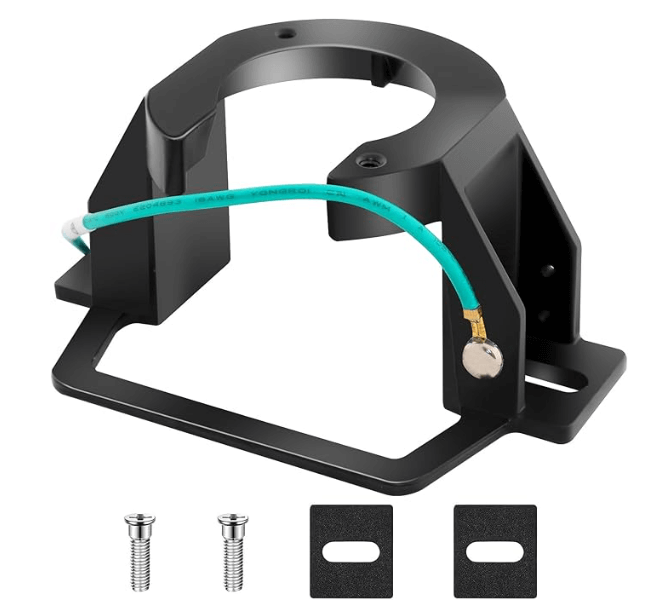
The mounting bracket is a crucial part of any ceiling fan system. It acts as the anchor point that holds the fan motor and blades to the ceiling, ensuring that your Hunter fan stays securely in place while it operates. If the mounting bracket becomes damaged, worn, or loose, it can result in wobbling, improper operation, or even cause the fan to fall.

Why Would You Need to Replace the Mounting Bracket?

Here are some common reasons why you might need to replace the mounting bracket of your Hunter ceiling fan:

  1. Wobbling or Instability: If your fan is wobbling or vibrating excessively, the mounting bracket might be the culprit. Over time, loose screws or damaged parts can cause the fan to become unbalanced.
  2. Improper Installation: If the fan wasn’t properly installed to begin with, the mounting bracket might not be holding the fan securely to the ceiling. In this case, replacing the bracket is necessary to restore stability.
  3. Wear and Tear: Even the best fans wear out after many years of use. Fan parts such as the mounting bracket can degrade, especially if subjected to high levels of humidity or constant movement.
  4. Upgrading to a Larger Fan: If you decide to upgrade your Hunter fan to a larger model, the original mounting bracket may not be suitable. Larger fans require a stronger bracket to handle the increased weight and airflow.

3. How to Identify the Right Replacement Mounting Bracket

Before purchasing a replacement mounting bracket, it’s essential to ensure that the part is compatible with your Hunter ceiling fan model. Here’s how you can identify the correct replacement bracket:

1. Locate Your Fan Model Number

The first step in identifying the right replacement parts is to locate your Hunter ceiling fan’s model number. This number will tell you exactly which parts are compatible with your fan.

  • Where to Find the Model Number: The model number is typically located on the motor housing or top of the fan. You may need to remove the fan’s cover or blades to view the label.
  • What Information is Included: The model number will tell you the fan’s series (e.g., 5-series, 2-series), the motor type, and other specifications that will help you find compatible parts.

2. Use the Hunter Fan Website or Manual for Compatibility

Once you’ve identified the model number, you can easily find replacement mounting brackets by searching the Hunter Fan website or consulting the user manual that came with your fan.

  • Hunter Fan Website: The official Hunter ceiling fans website has a parts section where you can look up compatible parts based on your fan model number.
  • User Manual: The manual will also have details on the mounting bracket and other parts that are designed to work with your specific fan.

4. Tools Needed for Mounting Bracket Replacement

Replacing a Hunter ceiling fan mounting bracket requires a few basic tools. Here’s a list of what you’ll need to get started:

Essential Tools:

  • Screwdrivers (Phillips and flathead) for removing and tightening screws.
  • Wrench or Socket Set for loosening bolts.
  • Pliers to assist with removing any fasteners.
  • Ladder to safely access the ceiling fan.
  • Electrical Tape (optional) to secure wiring connections during installation.

Safety Gear:

  • Safety Glasses to protect your eyes from debris and falling screws.
  • Gloves to protect your hands from sharp edges and to improve grip while handling the mounting bracket.

5. Step-by-Step Guide: How to Replace Your Hunter Ceiling Fan Mounting Bracket

Now that we’ve covered the tools and parts, let’s go over the steps required to replace your Hunter ceiling fan mounting bracket. This is a straightforward DIY process that can restore your fan’s performance and prevent any wobbling or instability.

Step 1: Turn Off the Power

Before starting any work on your ceiling fan, turn off the power at the wall switch or circuit breaker to avoid electrical hazards.

Step 2: Remove the Fan Blades and Light Kit

If your Hunter ceiling fan has blades and a light kit, carefully remove these parts to reduce the fan’s weight and gain access to the mounting bracket.

Step 3: Remove the Old Mounting Bracket

Use your screwdriver or wrench to remove the screws or bolts that are securing the old mounting bracket to the ceiling and the fan motor. Gently lower the fan motor to take out the old bracket.

Step 4: Install the New Mounting Bracket

Take the new replacement mounting bracket and align it with the ceiling mount. Attach the mounting bracket to the ceiling securely, using the screws or bolts provided. Make sure the fan motor is correctly positioned on the new bracket.

Step 5: Reassemble the Fan

Once the new bracket is installed, reattach the fan blades, light kit, and any other components that were removed earlier.

Step 6: Test the Fan

Turn the power back on, and test the fan to make sure it’s properly secured and running smoothly. Check for any wobbling or noise that could indicate the bracket is not securely installed.

6. Where to Buy Hunter Ceiling Fan Mounting Brackets

When replacing the mounting bracket for your Hunter ceiling fan, it’s essential to purchase genuine replacement parts to ensure optimal performance. Below are the best places to buy your Hunter ceiling fan mounting bracket:

Official Hunter Fan Website

  • Visit the Hunter Fan website for genuine parts and direct purchases. They offer a variety of replacement parts, including mounting brackets.

Buy Replacement Mounting Bracket at Hunter Fan Website – Affiliate Link

Authorized Retailers

  • Amazon, Home Depot, and Lowe’s are trusted authorized retailers where you can find Hunter replacement parts, including the mounting bracket.

Shop Hunter Parts on Amazon – Affiliate Link
Find Mounting Bracket at Home Depot – Affiliate Link

Local Fan Shops

  • Local home improvement stores and fan specialty stores often carry Hunter ceiling fan parts. Call ahead to ensure they have the correct mounting bracket for your fan model.

7. Cost of Hunter Ceiling Fan Mounting Bracket

When it comes to replacing the mounting bracket for your Hunter ceiling fan, understanding the potential costs is essential to help you make an informed decision. The cost of a mounting bracket can vary based on factors such as model compatibility, material quality, and whether you opt for professional installation. Below is a breakdown of the typical cost and what influences it.

1. Average Price Range for Replacement Brackets

The price of a Hunter ceiling fan mounting bracket typically falls within the following range:

  • $20 – $50 for a genuine replacement mounting bracket.
  • This price range covers standard mounting brackets for most Hunter ceiling fan models.

Factors that can affect the price include:

  • Size: Larger or more complex brackets for bigger fan models may cost slightly more.
  • Material: High-quality steel or rust-resistant materials tend to be on the higher end of the pricing spectrum.

2. Professional Installation Costs

While replacing a mounting bracket is a DIY-friendly task, some users may prefer to hire a professional for installation. This is especially true for those who aren’t familiar with electrical work or those who want to ensure the installation is safe and secure.

  • Installation Cost: The average cost for professional installation typically ranges from $75 to $150 depending on your location and the complexity of the installation.
  • Factors Affecting Installation Costs:
    • Ceiling height: If your fan is installed in a high or difficult-to-reach spot, the installation may require extra tools or labor, increasing the cost.
    • Fan size and weight: Larger fans may require more effort during installation, particularly if the mounting bracket needs to support additional weight.

Hiring a professional can be beneficial if you’re not comfortable with wiring or safety procedures. However, with proper guidance and tools, many users prefer to perform this task themselves.

3. Why You Should Invest in Genuine Hunter Parts

While third-party or aftermarket mounting brackets may seem like a more affordable option, genuine Hunter replacement parts provide the following benefits:

  • Perfect Compatibility: Genuine parts are specifically designed for Hunter ceiling fans, ensuring a perfect fit and optimal performance.
  • Durability: Hunter parts are made from high-quality materials that are designed to last, offering better longevity compared to aftermarket parts.
  • Warranty: Using genuine Hunter parts often ensures that your fan’s warranty remains intact. This is important if you encounter any issues later and need to take advantage of Hunter’s warranty.

Investing in genuine replacement parts may initially cost a little more, but it pays off in the long run by ensuring your Hunter fan remains safe, efficient, and reliable for years to come.

8. Customer Reviews and Experiences

Before making a purchase, it’s helpful to look at real customer experiences regarding Hunter ceiling fan mounting brackets. Customer reviews often provide insight into installation ease, product quality, and overall satisfaction.

Real Feedback on Hunter Ceiling Fan Mounting Bracket

  • Ease of Installation: Many customers appreciate how easy it is to install a replacement mounting bracket, especially when using genuine Hunter parts. Reviewers often mention that the brackets fit perfectly and align with the fan’s motor, making the installation smooth.
  • Durability and Performance: Users often report that genuine replacement brackets offer improved stability and reduced wobbling, restoring their fan’s optimal performance. A correctly installed bracket ensures the fan operates quietly and with minimal vibration.
  • Installation Support: Some customers mention how helpful the Hunter fan manual is when performing the installation. With clear instructions and diagrams, users can install replacement parts with ease.

Success Stories

Many customers who replaced their mounting brackets found that their Hunter ceiling fans regained stable operation and reduced noise. One reviewer mentioned, “My fan has never been so quiet! The new mounting bracket fixed the wobbling, and it’s like having a brand-new fan.”

9. Conclusion

Replacing the mounting bracket on your Hunter ceiling fan is an essential part of maintaining its stability, performance, and longevity. Whether you’re replacing the bracket due to damage, wobbling, or upgrading to a larger fan, the process is relatively straightforward with the right tools and knowledge. Remember, opting for genuine Hunter replacement parts ensures compatibility, durability, and keeps your fan operating smoothly for years to come.

  • Where to Buy: Purchase your Hunter ceiling fan mounting bracket from trusted sources like the Hunter Fan website, Amazon, Home Depot, or Lowe’s to ensure you’re getting a high-quality part.
  • Installation: If you’re confident in your DIY skills, follow the easy installation steps to get your Hunter fan back in working order. If you need help, don’t hesitate to seek professional assistance.

By replacing a faulty mounting bracket, you’ll ensure your Hunter ceiling fan continues to operate efficiently, providing you with cool comfort and energy savings for years to come.

For more detailed installation or troubleshooting guidance, feel free to visit our Hunter Ceiling Fans Installation Guide for additional tips and help.
Filed Under: Hunter Ceiling Fan Parts

Hunter Ceiling Fan Replacement Parts

April 13, 2025 by admin Leave a Comment

When your Hunter ceiling fan stops working as efficiently as it once did, or parts begin to wear out, you may be wondering where to find replacement parts. A ceiling fan is an essential fixture in many homes, providing cooling relief during the summer and circulating air during the winter, so keeping it in top condition is key to its continued performance. Whether it’s worn-out blades, a malfunctioning motor, or a faulty remote control, replacing parts is often the best way to get your Hunter fan running smoothly again.

Hunter Fans are known for their durability, innovative designs, and long-lasting performance, but like any mechanical device, parts can wear out over time. Luckily, Hunter Fan Company offers a wide selection of genuine replacement parts that are designed to fit perfectly and maintain the fan’s efficiency and performance.

In this comprehensive guide, we’ll cover everything you need to know about Hunter ceiling fan replacement parts. From common parts that need replacing to where you can buy them, how to install them, and the costs involved, we’ll ensure that you have all the information to keep your Hunter ceiling fan running as good as new.

Let’s dive into the world of Hunter ceiling fan parts, how to identify when they need replacing, and how to easily replace them yourself!

Common Hunter Ceiling Fan Parts That Need Replacing

Over time, Hunter ceiling fans may require maintenance or replacement of certain parts to ensure that they continue to perform at their best. Whether you’re dealing with a malfunctioning motor, worn-out blades, or a flickering light kit, understanding which parts are likely to wear out or fail is key to ensuring the longevity of your fan. Below are some of the most common parts that may need replacing:

1. Fan Blades

Fan blades are the most commonly replaced part of a Hunter ceiling fan. Over time, they can get damaged, warped, or accumulate dust, which may impact their aesthetic appeal and performance.

  • When to Replace: If your fan blades are causing the fan to wobble, are broken, or if they appear warped, it’s time to replace them.
  • Replacement Options: Hunter offers reversible blades in various styles and finishes, such as Dark Gray Oak, Drifted Oak, and Fresh White, allowing you to not only replace the blades but also update the fan’s appearance to suit your décor.

2. Motor

The motor is the heart of any ceiling fan, and it’s crucial for providing smooth operation and optimal airflow. Hunter fans are equipped with WhisperWind® motors known for silent and efficient operation.

  • When to Replace: If your fan is no longer spinning properly, the motor is noisy, or if the fan won’t start, it’s likely that the motor needs to be replaced.
  • What to Expect: Replacing the motor can be a bit more technical and may require professional installation unless you’re familiar with ceiling fan mechanics.

3. Remote Control

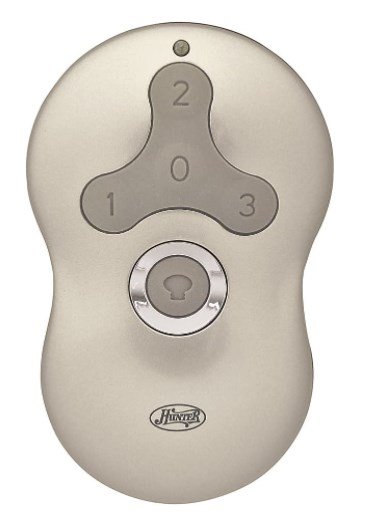
Hunter 99123 Indoor Ceiling Fan Universal Remote Control

The remote control allows you to control fan speed, light settings, and fan direction with ease. Over time, the remote may fail to pair with the receiver or become unresponsive due to battery depletion or wiring issues.

  • When to Replace: If the remote is no longer syncing with the fan, doesn’t work despite new batteries, or stops controlling the fan altogether, it may need to be replaced.
  • Replacement Options: You can purchase genuine Hunter replacement remotes that are pre-programmed for easy syncing with your Hunter ceiling fan.

4. Receiver

The receiver allows communication between the remote control and the fan motor. If the fan isn’t responding to the remote or the fan stops working after a remote replacement, it could be an issue with the receiver.

  • When to Replace: If you’ve replaced the remote and the fan still isn’t responding, it’s possible that the receiver is malfunctioning.
  • What to Expect: Replacing the receiver is relatively simple, but it may require accessing the fan’s wiring to install the new receiver. Ensure that the new receiver is compatible with your fan model.

5. Light Kit

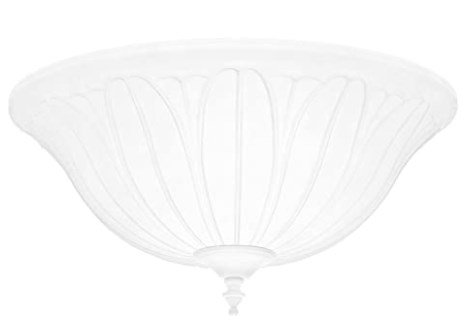
Hunter 99158 White Cased Bowl Light Kit

The light kit on Hunter ceiling fans provides essential lighting and often includes LED bulbs that help to illuminate the room while the fan operates. Over time, the light fixture or bulbs can burn out or become damaged.

  • When to Replace: If the light kit is flickering, dim, or the bulbs no longer work, it’s time to replace the light kit. This may also be the case if you want to upgrade to a more energy-efficient light kit.
  • Replacement Options: Hunter offers a variety of light kits with LED bulbs, providing ambient, warm light. You can also upgrade to a dimmable light kit if you want more control over your fan’s lighting.

6. Downrod and Mounting Hardware

The downrod connects the fan to the ceiling and ensures the proper height and stability. Over time, the downrod may need replacing if it becomes damaged, or if you need a longer downrod to fit a higher ceiling.

  • When to Replace: If you experience wobbling or instability in the fan, or if the downrod is rusting, it’s time to replace it.
  • What to Expect: Ensure that the replacement downrod is the right length for your ceiling height. Hunter provides various sizes of downrods to fit different room specifications.

7. Pull Chains

The pull chains on your ceiling fan control the fan speed and the light. Over time, pull chains can wear out or break.

  • When to Replace: If the pull chain is broken, stuck, or if you are unable to adjust the fan speed or light with it, it’s time for a replacement.
  • Replacement Options: Hunter pull chains are available for purchase, and they are easy to replace if you follow the instructions in the fan’s manual.

8. Capacitors

The capacitor helps regulate the fan’s speed and ensures that the motor runs smoothly. Over time, the capacitor may burn out or stop working properly.

  • When to Replace: If the fan is running slowly, not turning on, or not responding to speed adjustments, it may be due to a faulty capacitor.
  • What to Expect: Replacing the capacitor is more technical and may require assistance from a professional unless you have experience with electrical components.

Where to Buy Hunter Ceiling Fan Replacement Parts

When it comes to replacing parts for your Hunter ceiling fan, it’s crucial to ensure that you are purchasing genuine replacement parts. Not only do these parts fit perfectly, but they also maintain the fan’s performance and longevity. In this section, we’ll discuss the best places to buy Hunter ceiling fan replacement parts.

1. Official Hunter Fan Company Website

The Hunter Fan Company website is the most reliable source for purchasing genuine replacement parts. It’s the best place to find parts specifically designed for Hunter ceiling fans, ensuring compatibility and performance.

  • Genuine Parts: The Hunter Fan website carries an extensive selection of replacement parts, from motor replacements to fan blades, remote controls, and light kits.
  • Quick Shipping: The official website often offers quick shipping for replacement parts, so you can get your Hunter fan back up and running in no time.
  • Customer Support: If you’re unsure which part is right for your fan, Hunter’s customer support can help guide you through selecting the correct part and provide installation instructions.

Buy Replacement Parts Directly from Hunter – Affiliate Link

2. Authorized Retailers

Many trusted retailers carry Hunter fan parts, either online or in-store. Some of the most reliable places to purchase Hunter fan parts include:

  • Amazon: One of the largest online retailers, Amazon offers a wide selection of Hunter ceiling fan parts. You can find everything from remote controls to fan blades and light kits.
  • Home Depot: Home Depot is an authorized retailer for Hunter fans and offers various replacement parts for your ceiling fan, including batteries, remote controls, and motors.
  • Lowe’s: Another major retailer, Lowe’s stocks Hunter ceiling fan parts and provides both online shopping and in-store pickup options.

Using these authorized retailers ensures that you are getting genuine parts that are designed to work perfectly with your Hunter ceiling fan.

Shop for Hunter Fan Parts on Amazon – Affiliate Link
Find Hunter Fan Parts at Home Depot – Affiliate Link

3. Third-Party Suppliers

If you are unable to find a specific part on the Hunter Fan website or authorized retailers, there are trusted third-party suppliers that also offer Hunter fan parts. Websites such as CeilingFanParts.com, Fanimation, and FanParts.com provide a range of genuine and compatible replacement parts for Hunter ceiling fans.

  • Variety: These suppliers often carry hard-to-find parts or older parts for out-of-production Hunter fans.
  • Compatibility: Make sure that the parts you purchase from third-party suppliers are Hunter-approved and are compatible with your specific model.

Find Replacement Parts from Flushmountedceilingfans.com – Affiliate Link

4. Local Fan Shops and Electricians

If you prefer shopping in person, local fan shops and electricians often carry replacement parts for Hunter fans. Local stores may provide the benefit of speaking to someone who can help you choose the right part and even assist with installation if needed.

  • Local Availability: Check with local home improvement stores or specialty fan stores in your area to see if they carry Hunter fan parts.
  • Professional Installation: Some electricians may also have access to Hunter replacement parts and offer installation services.

Why It’s Important to Choose Genuine Hunter Parts

When purchasing Hunter ceiling fan replacement parts, always opt for genuine Hunter parts. While third-party parts may appear less expensive, they often do not meet the same quality standards and can lead to incompatibility, performance issues, and safety hazards. By choosing Hunter-approved parts, you ensure that your fan continues to operate efficiently and safely, extending its lifespan.

How to Identify the Right Replacement Parts for Your Hunter Ceiling Fan

Finding the right replacement parts for your Hunter ceiling fan is crucial to ensure optimal performance and compatibility. Hunter fans are designed with specific part numbers, and knowing how to identify the correct parts can save you time, money, and frustration. Here’s how to ensure you’re purchasing the right replacement parts for your fan.

1. Locate Your Hunter Ceiling Fan Model Number

The first step in finding the correct replacement parts for your Hunter ceiling fan is identifying the model number. The model number tells you which Hunter fan you have, ensuring compatibility with replacement parts like motors, fan blades, light kits, and more.

  • Where to Find the Model Number:
    • The model number can be found on the ceiling fan’s motor housing, usually on the top of the fan. It’s often labeled on a small sticker or metal plate that includes both the model and serial number.
    • Check the user manual: If you still have the user manual, the model number will also be listed on the first page.
    • Online Lookup: If you don’t have the manual or can’t find the label, you can use the Hunter website or the serial number to help identify the model.

2. Check Part Numbers for Compatibility

Once you’ve identified the model number, the next step is to check the part numbers for compatibility. Hunter provides specific part numbers for each fan model, ensuring that only the correct replacement parts fit your fan.

  • How to Find Compatible Parts:
    • Visit the Hunter Fan website and search for your fan model number. This will provide a list of compatible parts that can be purchased, including motors, blades, and light kits.
    • Check the part numbers on replacement parts (e.g., fan blades or motors) before purchasing to ensure they match your fan model.
    • If you are unsure about the compatibility, you can always contact Hunter customer support to confirm the correct parts for your model.

3. Use the Hunter Fan Manual for Specific Part Information

If you still have the original manual that came with your Hunter ceiling fan, it will provide detailed information about compatible parts and their part numbers.

  • Using the Manual:
    • The manual includes information on motor types, fan blade sizes, and light kit compatibility for your specific Hunter model.
    • If you don’t have the manual, you can access digital copies of the Hunter ceiling fan manuals on the official Hunter website.

4. Consider Model Series and Variations

Hunter fans come in different series (e.g., 5-series, 2-series), each with specific parts and features. If your fan is part of a certain series, it’s important to ensure that the replacement parts you purchase are designed for that series.

  • Check Your Fan Series:
    • Identify whether your Hunter fan belongs to a 5-series or 2-series fan. 5-series fans are generally newer models, while 2-series fans are older and may require different parts.
    • The serial number or model number will often indicate the series.

5. Use the Hunter Website or Customer Support for Assistance

If you’re unsure about which parts are compatible with your Hunter ceiling fan, Hunter customer service is a great resource for assistance.

  • Customer Support: Hunter offers phone support, email support, and a contact form to help you find the right parts. You can get detailed information on part numbers, availability, and compatibility from the support team.

Contact Hunter Fan Support for Assistance

Why Proper Part Identification is Crucial

Ensuring that you purchase the correct replacement parts for your Hunter ceiling fan is essential for maintaining optimal performance and safety. Incorrect parts can lead to issues like motor malfunction, increased noise, and reduced air circulation, which will ultimately affect your fan’s longevity and effectiveness.

By taking the time to identify the right parts and purchasing genuine Hunter replacement parts, you can ensure that your Hunter ceiling fan continues to operate smoothly, providing comfort for years to come.

DIY Installation of Hunter Ceiling Fan Replacement Parts

Installing replacement parts for your Hunter ceiling fan can be a simple and rewarding process if done correctly. Whether you’re replacing fan blades, the motor, or the light kit, DIY installation is possible for many users, as long as proper steps are followed for safety and functionality. Here’s a step-by-step guide for replacing common parts in Hunter ceiling fans.

1. Fan Blade Replacement

Over time, fan blades can become damaged, bent, or simply dirty, affecting the performance and aesthetic of your fan. Replacing the blades is an easy DIY task that can restore the airflow and appearance of your Hunter fan.

  • How to Replace Fan Blades:
    • Step 1: Turn off the power to your Hunter fan at the wall switch or circuit breaker.
    • Step 2: Use a screwdriver to remove the screws securing the old blades to the motor assembly.
    • Step 3: Attach the new fan blades using the same screws or hardware that came with the replacement blades. Make sure each blade is securely fastened.
    • Step 4: Turn the power back on and test the fan to ensure the new blades are working properly.

2. Motor Replacement

The motor is the heart of any Hunter ceiling fan. If your fan is making unusual noises, has stopped working, or is not responding to the remote control, it may be time to replace the motor.

  • How to Replace the Motor:
    • Step 1: Turn off the fan and disconnect it from the power source.
    • Step 2: Remove the fan blades and light kit (if applicable).
    • Step 3: Unmount the fan motor by loosening the screws holding the motor in place.
    • Step 4: Disconnect the motor’s wiring from the ceiling and remove the old motor.
    • Step 5: Install the new motor by reversing the steps, ensuring the wiring is securely connected.
    • Step 6: Reattach the blades and light kit, turn the power back on, and test the fan.

3. Remote Control Syncing

If your Hunter fan remote is not syncing with the fan, it may need to be reprogrammed. If the remote is broken or unresponsive, it may need replacement. Here’s how you can sync a new remote with your fan:

  • How to Sync the Remote:
    • Step 1: Turn off the fan at the wall switch for at least 10 seconds to ensure the receiver has time to reset.
    • Step 2: Turn the power back on to the fan.
    • Step 3: On the remote, press and hold the “Fan” and “Speed” buttons simultaneously for about 5 seconds.
    • Step 4: The fan’s light will blink and stay on, confirming the remote is paired.
    • Step 5: Test the remote to ensure it works properly with the fan.

4. Light Kit Installation

If your Hunter ceiling fan light kit is malfunctioning or outdated, replacing it can enhance the light quality and provide better ambiance in your room. Here’s how you can replace or upgrade your light kit:

  • How to Replace the Light Kit:
    • Step 1: Turn off the fan and disconnect power at the wall.
    • Step 2: Remove the old light kit by unscrewing the mounting screws.
    • Step 3: Disconnect the wiring from the old light kit and attach the wiring of the new light kit.
    • Step 4: Secure the new light kit in place and reassemble any parts that were removed.
    • Step 5: Turn the power back on and test the light to ensure it works properly.

5. Downrod Replacement

The downrod determines the height of your fan, and if you need to adjust it for a higher ceiling or to correct wobbling, you may need to replace or adjust it.

  • How to Replace the Downrod:
    • Step 1: Turn off the fan and disconnect power.
    • Step 2: Lower the fan by removing the fan blades and motor mount.
    • Step 3: Loosen the downrod from the fan’s mounting bracket and remove it.
    • Step 4: Attach a new downrod with the correct length for your ceiling height.
    • Step 5: Reassemble the fan by reversing the disassembly steps.

6. Pull Chain Replacement

If the pull chain is broken or stuck, it can prevent you from adjusting the fan’s speed or light. Fortunately, Hunter replacement pull chains are easy to install.

  • How to Replace the Pull Chain:
    • Step 1: Turn off the fan and disconnect it from the power.
    • Step 2: Locate the pull chain mechanism (usually under the motor housing).
    • Step 3: Remove the old pull chain and install the new one.
    • Step 4: Test the fan to ensure the pull chain functions properly.

Tips for a Successful DIY Fan Repair:

  • Always turn off the power before starting any installation or replacement.
  • Use appropriate tools and make sure all screws are securely tightened to avoid future issues.
  • If you’re unsure about any step, consult your Hunter ceiling fan manual or contact customer support for guidance.

By following these steps, you can keep your Hunter ceiling fan running smoothly and extend its lifespan. Regular maintenance and part replacement can improve your fan’s performance and efficiency.

Troubleshooting Before Replacing Parts

Before diving into part replacements, it’s important to troubleshoot your Hunter ceiling fan to determine if the issue really requires a replacement part. Many problems with ceiling fans can be resolved with simple fixes, saving you time and money. Below are some common issues with Hunter ceiling fans and possible troubleshooting solutions.

1. Fan Not Turning On

If your Hunter ceiling fan isn’t turning on, there are a few potential reasons for this.

  • Power Supply: The first thing to check is whether the fan is receiving power. Ensure the wall switch is turned on, and check if the breaker has tripped. If everything seems fine, move on to the next step.
  • Remote Control: If you’re using a remote control, ensure that the batteries are working. A dead battery can cause the fan to stop responding. Try replacing the batteries or re-syncing the remote with the fan.
  • Motor Connection: If the fan still doesn’t work, there could be an issue with the motor wiring. Check the motor connections and ensure they are properly connected.

2. Fan Wobbling

Fan wobble is a common issue that can occur due to several factors. While wobble-free operation is a feature of Hunter fans, external factors can still cause wobbling over time.

  • Fan Blades: Over time, fan blades can become warped, which will cause wobbling. Check if any of the blades are damaged or uneven. Replacing damaged blades or swapping them out for new blades often fixes the issue.
  • Tighten the Screws: Make sure that all screws holding the fan blades and motor in place are securely tightened. Loose connections can also lead to wobbling.
  • Downrod and Mounting: If your fan has been installed improperly or if the downrod isn’t properly aligned, it can cause wobbling. In such cases, reinstalling the fan or adjusting the downrod may be necessary.

3. Noisy Fan Operation

If your Hunter ceiling fan is making an unusual noise (buzzing, grinding, or clicking), here are some common causes:

  • Fan Blades: Ensure that the fan blades are properly aligned. If they are uneven or have accumulated dirt, it can cause noise. Clean the blades regularly to avoid buildup.
  • Motor: A noisy motor could indicate a malfunction or lack of lubrication. If the motor is making grinding or squealing sounds, the motor may need to be replaced. However, it’s worth trying to lubricate the motor before deciding to replace it.
  • Loose Components: Check for any loose screws in the fan’s mounting bracket, motor housing, or light kit. Tighten any loose screws to reduce vibrations and noise.

4. Light Flickering or Not Turning On

If your Hunter ceiling fan light is flickering or won’t turn on, there are a few things to check before replacing the light kit.

  • Bulb: The most common reason for flickering lights is a faulty bulb. Make sure the LED bulbs or incandescent bulbs are securely screwed in and replace them if necessary.
  • Wiring: If the light still flickers or doesn’t work after replacing the bulb, there may be an issue with the wiring. Check the light kit connections and make sure they are secure.
  • Remote Control: If the fan is using a remote control to operate the light, try resetting the remote or replacing its batteries. Also, make sure the receiver is working properly.

5. Fan Speed Not Working

If the fan speed is not responding or is stuck on one setting, this can be caused by a malfunctioning receiver or remote control.

  • Remote Control Issues: Sometimes, the remote control can lose its sync with the fan receiver. Try reprogramming the remote and ensure that the batteries are functioning.
  • Receiver Problems: If the issue persists, it could be the receiver that needs replacing. The receiver is responsible for regulating the fan’s speed, and if it fails, it may cause the fan to get stuck on one speed.

Why Troubleshooting is Important Before Replacing Parts

Before investing in replacement parts, it’s essential to troubleshoot and eliminate simpler issues first. Many common problems with Hunter ceiling fans can be fixed without replacing major parts. Properly identifying the issue will help you determine whether a simple fix (like replacing a bulb or battery) will solve the problem, or if a major component, like the motor or receiver, needs to be replaced.

By following the troubleshooting steps outlined above, you can ensure that you don’t waste time or money on replacement parts you don’t need.

Cost of Hunter Ceiling Fan Replacement Parts

When it comes to maintaining your Hunter ceiling fan, replacing parts is often necessary to keep the fan running at its best. The cost of replacement parts can vary depending on the part itself and where you purchase it from. Below, we’ll break down the average cost of various Hunter ceiling fan replacement parts to help you understand what to expect.

1. Fan Blades

Fan blades are one of the most common parts that need replacing, especially if they become damaged or warped. The price of Hunter fan blades can vary based on the material (wood, plastic, metal) and the size of the blades.

  • Average Price Range: $30 – $70 for a set of 5 blades.
  • Factors Affecting Price: The material of the blades (e.g., wooden blades may be more expensive than plastic blades) and the blade size (e.g., 42-inch blades will typically cost less than 52-inch blades).

If you’re looking to upgrade your fan’s appearance or improve performance, choosing higher-end Hunter blades may come at a premium, but they are made with high-quality materials that ensure longevity and optimal airflow.

2. Motor Replacement

The motor is one of the more expensive parts of your Hunter ceiling fan. While Hunter fans are known for their WhisperWind® motors, these motors may eventually need replacing if they malfunction or fail to work properly.

  • Average Price Range: $100 – $200 for a replacement motor.
  • Installation: Since replacing a fan motor can be a complex task, consider professional installation, which may add $50 – $150 depending on your location and the complexity of the job.

When replacing the motor, it’s important to ensure that the replacement is compatible with your Hunter fan model.

3. Remote Control

If your Hunter ceiling fan remote stops working, replacing it is usually straightforward and affordable. Hunter remotes can be purchased directly from Hunter or from third-party retailers.

  • Average Price Range: $20 – $50 for a Hunter replacement remote.
  • Smart Remotes: If you’re replacing a smart remote with Wi-Fi capabilities, you can expect the price to be on the higher end of the range.

Having a replacement remote ensures you can continue enjoying the convenience of controlling your fan’s speed, direction, and lighting from a distance.

4. Light Kit

Light kits are an essential component of many Hunter ceiling fans, providing illumination to your room. The price of replacing a light kit can vary based on the type of light (e.g., LED light kits tend to be more expensive) and the design.

  • Average Price Range: $30 – $80 for a replacement light kit.
  • Upgrading the Light Kit: If you decide to upgrade to an LED light kit for better energy efficiency and longer-lasting bulbs, the cost may be slightly higher, but it will save on electricity costs in the long run.

5. Downrod and Mounting Hardware

Hunter 12 inch brushed nickel downrod

If you’re replacing the downrod or mounting hardware, the cost is generally affordable and will depend on the length of the downrod and whether you need additional mounting accessories.

  • Average Price Range: $10 – $30 for replacement downrods.
  • Considerations: The price can vary depending on the length (longer downrods cost more) and material (e.g., metal downrods tend to cost more than plastic downrods).

Hunter fans offer various length options, making it easy to find the right downrod to fit your room height.

6. Capacitors

The capacitor regulates the fan’s speed, and if it malfunctions, the fan will not work properly. Replacing the capacitor is often necessary if your fan is running slowly or not responding to the speed settings.

  • Average Price Range: $15 – $30 for a replacement capacitor.
  • Installation: If you’re comfortable with electrical work, you may be able to replace the capacitor yourself. However, if you’re unsure, it’s best to hire a professional to handle the installation.

7. Pull Chains

Pull chains are relatively inexpensive to replace and can often be fixed yourself if they become stuck or broken.

  • Average Price Range: $5 – $15 for replacement pull chains.
  • DIY Replacement: Replacing the pull chain is a simple process and can be done in under 30 minutes.

What Affects the Cost of Replacement Parts?

  • Part Type: More complex parts, like the motor, receiver, or light kit, will generally be more expensive than basic parts like pull chains or capacitors.
  • Model Compatibility: Some Hunter fan models may require specialized or custom parts, which can increase the cost.
  • Installation: If you choose to have a professional install the replacement part, you may need to factor in the cost of labor, which can range from $50 – $150 per hour, depending on your location and the complexity of the installation.

Understanding the Cost of Hunter Ceiling Fan Replacement Parts

Understanding the costs associated with replacement parts can help you make an informed decision when maintaining your Hunter ceiling fan. While some parts, such as fan blades and pull chains, are relatively inexpensive, others like the motor or light kit may require a more significant investment. Regardless of the part, opting for genuine Hunter replacement parts ensures that your fan continues to perform optimally and last longer.

If you’re unsure about which part needs replacing, consider reviewing your fan model and checking out our Hunter Ceiling Fan Troubleshooting Guide for additional tips. And remember, choosing quality replacement parts and professional installation can save you money in the long run by maintaining the fan’s performance and energy efficiency.

Benefits of Regularly Replacing Hunter Ceiling Fan Parts

Maintaining your Hunter ceiling fan by replacing worn-out or malfunctioning parts offers a variety of benefits that extend far beyond the immediate improvement in performance. Regular part replacement not only enhances your fan’s efficiency and lifespan but also contributes to energy savings, enhanced comfort, and improved aesthetics. Below are the top reasons why it’s important to stay on top of Hunter ceiling fan replacement parts.

1. Improved Performance and Efficiency

Over time, parts like motor bearings, capacitors, and fan blades can wear out, reducing your fan’s ability to provide optimal airflow. When you replace these worn parts, your fan operates at peak efficiency, providing better cooling and circulation. This means:

  • Increased Airflow: Replaced fan blades and a new motor help maintain optimal airflow, ensuring that your fan works efficiently in hot summer months and aids air circulation in the winter.
  • Energy Savings: A well-maintained fan will use less energy, meaning lower electricity bills. A WhisperWind® motor in a Hunter fan, for example, provides powerful airflow without consuming excessive energy.

Replacing damaged parts ensures your fan continues to deliver high-efficiency cooling, making your home more comfortable without spiking your energy consumption.

2. Extended Lifespan

When you regularly replace parts such as light kits, remote controls, or fan motors, you’re extending the overall lifespan of your Hunter ceiling fan. Worn parts can put strain on the fan’s motor or wiring, leading to further damage and potential fan failure. Replacing these parts proactively helps:

  • Prevent Breakdowns: Timely replacement of faulty components prevents complete system failures, meaning your fan will serve you for years.
  • Protect Other Parts: Replacing one malfunctioning part prevents damaging other components, such as the motor or electrical wiring, thus saving you the cost of major repairs.

3. Safety

Regular replacement of parts like remote controls, fan blades, and motors ensures that your Hunter ceiling fan remains safe for use. Broken blades or malfunctioning motors can pose serious safety risks, such as fire hazards or falling blades. By keeping your fan in proper working order:

  • Avoid Electrical Issues: Old wiring or malfunctioning parts can lead to short circuits or overheating. Replacing worn components like capacitors or motors ensures that the electrical system remains safe and efficient.
  • Prevent Fan Failure: A wobbly fan or improperly secured blades can fall, causing accidents. Replacing broken pull chains or fan blades ensures your fan remains stable and secure.

4. Enhanced Comfort

By replacing fan blades, light kits, or remote controls, you are ensuring that your Hunter ceiling fan continues to provide the comfort you need. Some specific reasons include:

  • Better Airflow Control: Replacing a faulty remote control or receiver ensures you can adjust the fan speed and direction with ease, allowing you to customize your comfort levels throughout the year.
  • Improved Lighting: Replacing light bulbs or light kits can brighten up your space, making it more comfortable and cozy for family gatherings, movie nights, or reading.

Having a fully functioning fan ensures that you can enjoy optimal comfort in your home, year-round.

5. Aesthetic Improvements

Sometimes, replacing old fan blades or a damaged light kit can dramatically improve the look of your Hunter ceiling fan. Since ceiling fans are often a focal point of room decor, maintaining a fresh, modern appearance is essential:

  • Upgrade to Modern Designs: If your fan blades are outdated or damaged, replacing them with new, stylish blades can give your fan a fresh new look.
  • Brighten Up with New Lights: If your light kit is dimming or the bulbs are burnt out, replacing the light fixture with a new LED light kit can improve both the aesthetic appeal and lighting quality in your room.

By replacing outdated parts, you can keep your Hunter ceiling fan looking brand new, matching any new home decor or renovations.

Conclusion: Keep Your Hunter Ceiling Fan Running Smoothly

Replacing parts of your Hunter ceiling fan is an essential task that can enhance its performance, longevity, and overall functionality. Whether you’re upgrading the light kit, replacing worn fan blades, or fixing a broken pull chain, maintaining your fan with genuine Hunter parts will ensure that it operates at its best, year after year.

By following the DIY installation tips for replacement parts and choosing genuine Hunter products, you can continue enjoying the comfort and efficiency that Hunter ceiling fans are known for. Regular maintenance not only helps you avoid costly repairs but also improves safety, airflow, and energy savings.

Remember, a well-maintained Hunter ceiling fan is an investment in comfort, safety, and style. If you ever encounter issues or need specific replacement parts, make sure to visit Hunter ceiling fans website or consult our detailed guides for further assistance.

Filed Under: Hunter Ceiling Fan Parts

Hunter Ceiling Fan Balancing Kit

April 8, 2025 by admin Leave a Comment

Why You Need the Hunter Ceiling Fan Balancing Kit

If you own a ceiling fan, you know how important it is for it to operate smoothly and quietly. A well-balanced fan ensures even airflow, reduces energy consumption, and operates quietly, providing comfort to your home. However, if your fan starts wobbling, making noise, or running unevenly, it can disrupt your comfort and even cause damage over time.

balance ceiling fan blades

Hunter ceiling fans, known for their durability and performance, can sometimes experience these common issues, especially as they age or accumulate dust and debris. Fortunately, there’s a simple solution: the Hunter Ceiling Fan Balancing Kit.

In this guide, we’ll walk you through what the Hunter Ceiling Fan Balancing Kit is, how it can fix common issues like wobbling, and why it’s a must-have for anyone experiencing performance problems with their fan. Plus, we’ll give you tips on how to use it effectively and prevent these issues in the future, ensuring that your Hunter fan continues to provide comfort for years to come.

Whether you’ve noticed your fan making an annoying clicking sound or vibrating during operation, this guide will help you address these problems quickly and easily. Let’s get started by exploring the basics of the Hunter Ceiling Fan Balancing Kit and how it can transform your fan’s performance.

What Is the Hunter Ceiling Fan Balancing Kit?

The Hunter Ceiling Fan Balancing Kit is a specially designed toolset created to help you achieve smooth and balanced operation of your Hunter ceiling fan. It’s an essential accessory for fixing common fan issues, particularly when the fan begins to wobble or vibrate during use. This imbalance often leads to noise, reduced airflow efficiency, and a less-than-ideal overall experience.

tighten the fan blades

A balanced ceiling fan operates quietly and efficiently, while an imbalanced fan can cause issues such as excessive noise, vibrations, and even damage to the fan’s motor. The Hunter Ceiling Fan Balancing Kit addresses these issues by providing the tools necessary to balance the blades and correct any wobbling or shaking.

Typically, the kit includes:

  • Balancing Clips: These clips are attached to the fan blades to test for the source of the wobble.
  • Weights: Small weights are included to attach to specific areas of the fan blades, helping to evenly distribute weight and achieve balance.
  • Instructions: Easy-to-follow guidance that walks you through the balancing process, ensuring the fan is properly adjusted.

The kit is compatible with many Hunter ceiling fan models, offering a simple and cost-effective solution to a common issue that can affect the comfort and performance of your ceiling fan.

By using the Hunter Ceiling Fan Balancing Kit, you can restore the fan’s balance, improve its performance, and extend its lifespan. Whether you’re dealing with a noisy fan or an unsteady one, this kit ensures your ceiling fan runs smoothly, without the need for a professional repair technician.

Why You Should Use the Hunter Ceiling Fan Balancing Kit

1. Eliminates Wobbling and Noise Wobbling is one of the most common issues that ceiling fan owners face. An imbalanced fan doesn’t just wobble; it also creates unwanted noise that can be irritating, especially in rooms where you need peace and quiet. Using the Hunter Ceiling Fan Balancing Kit helps you eliminate this wobbling by balancing the blades, leading to a quieter fan operation.

2. Improves Airflow Efficiency An imbalanced ceiling fan doesn’t circulate air effectively, which can result in uneven temperatures in your room. By restoring balance to your fan, you ensure even airflow, enhancing your fan’s cooling and heating capabilities. A well-balanced fan can make your home feel more comfortable, especially in the summer or winter months.

3. Prevents Wear and Tear Wobbling and vibrations put undue stress on your ceiling fan’s motor and other components. Over time, this strain can cause the motor to wear out or other parts to break down, leading to costly repairs. By balancing the fan early on, you reduce the risk of these issues, helping your fan last longer and perform at its best.

4. Easy to Use and Cost-Effective The Hunter Ceiling Fan Balancing Kit is designed to be user-friendly, so you don’t need to be an expert to use it. You can quickly address wobbling and noise issues on your own, saving you time and money that you would have spent calling in a professional.

By using this balancing kit, you ensure your ceiling fan continues to operate smoothly, and you maintain the comfort and performance you expect from your Hunter fan. It’s a simple investment that can prevent more serious (and expensive) problems down the road.

Now that you know the importance of using the Hunter Ceiling Fan Balancing Kit, let’s dive into how to use it effectively to restore balance and performance to your fan.

Benefits of Using the Hunter Ceiling Fan Balancing Kit

  1. Eliminates Wobbling and Shaking The primary benefit of using a Hunter ceiling fan balancing kit is that it eliminates the wobbling and shaking that can occur when fan blades are out of balance. A balanced fan will spin evenly, making less noise and improving airflow efficiency.
  2. Reduces Wear and Tear When your ceiling fan is unbalanced, the motor has to work harder to keep the blades spinning. This added strain can lead to premature wear and tear on the motor and other internal components. Balancing the fan reduces the strain on the motor, helping it run more efficiently and extend the fan’s lifespan.
  3. Improved Noise Reduction Unbalanced blades often result in loud rattling or humming noises. The Hunter ceiling fan balancing kit helps fix these issues by stabilizing the fan blades, making your ceiling fan operate quietly—ideal for bedrooms, living rooms, or offices.
  4. Enhanced Comfort and Efficiency When your ceiling fan is balanced, it operates more efficiently. The airflow will be more consistent, providing a comfortable environment throughout the room. Plus, your fan will use less energy since it’s not working harder to compensate for imbalance.

How to Use the Hunter Ceiling Fan Balancing Kit

Using the Hunter Ceiling Fan Balancing Kit is a simple and straightforward process that can be completed in a few easy steps. Whether you’re a seasoned DIY enthusiast or someone new to fan maintenance, you’ll find this kit easy to use. Here’s a step-by-step guide to help you achieve a perfectly balanced ceiling fan:

Step 1: Turn Off the Power to Your Ceiling Fan

Before you begin, always ensure the power to the fan is turned off. This is a crucial safety step to prevent any electrical accidents while handling the fan blades and the balancing kit components.

  • Tip: Use the wall switch or circuit breaker to turn off the fan’s power completely.

Step 2: Inspect the Fan Blades

Take a close look at the fan blades to see if they show any obvious signs of damage or wear. Sometimes, the issue could be that one or more blades are bent or cracked, which can lead to imbalances. If any blades are visibly damaged, they should be replaced before proceeding with the balancing process.

Step 3: Attach the Balancing Clip

The Hunter Ceiling Fan Balancing Kit includes balancing clips that help identify the source of the wobble. To begin, take the balancing clip and attach it to the center of one of the fan blades. The clip should be placed at the middle of the blade, where it has the most effect on testing.

  • Note: Attach the clip to the blade while the fan is stationary, and avoid spinning it while adjusting.

Step 4: Turn the Fan Back On and Test for Wobbling

Once the balancing clip is securely attached to the blade, turn the fan back on to its lowest setting. Watch closely for any wobbling or uneven movement as the fan runs. The clip will help you identify whether one specific blade is causing the wobble.

  • Tip: If the wobbling doesn’t stop, move the balancing clip to a different blade. You may need to try several blades to identify the source of the imbalance.

Step 5: Add Weights to the Fan Blades

After identifying which blade is causing the imbalance, it’s time to add the provided weights. Start by placing a small weight on the center of the problematic blade. Gradually increase the weight in small increments until you find the optimal balance that stops the wobbling.

  • Important: Always add the weights one at a time and test the fan after each adjustment to ensure you are not overcompensating with too much weight.

Step 6: Remove the Balancing Clip

Once the wobble is eliminated, remove the balancing clip and any weights from the blade. This will return the fan to its normal appearance and performance.

  • Tip: Double-check that the fan runs smoothly without any noise or wobbling before completing the process.

Step 7: Final Test

With the fan now balanced, run the fan on different speed settings to ensure it operates evenly. If the fan is running smoothly without any wobble or excessive noise, you’ve successfully balanced your Hunter ceiling fan.

  • Pro Tip: Regularly inspect your ceiling fan and perform maintenance, including cleaning the blades and motor, to keep it operating efficiently.

By following these simple steps, you can restore the smooth, quiet operation of your Hunter ceiling fan, ensuring it continues to provide optimal comfort in your home. The Hunter Ceiling Fan Balancing Kit is an easy-to-use solution that can save you time, money, and the hassle of hiring a professional technician.

When to Call a Professional

While using the Hunter Ceiling Fan Balancing Kit is usually enough to fix minor wobbling issues, there are cases where the problem might be more complex. If you’ve followed the steps and the fan continues to wobble or make noise, it might indicate other underlying issues, such as:

  • Motor malfunction: If the motor is worn or damaged, it could cause the fan to vibrate or operate inefficiently, even after balancing.
  • Improper installation: If the fan wasn’t installed properly or securely, it could lead to persistent issues, including wobbling.
  • Damaged blades: If any blades are cracked or warped, they may need to be replaced to restore proper functionality.

In these cases, it’s best to call a professional technician who specializes in ceiling fan repairs. They can diagnose the issue and ensure your fan is running at its best.

By regularly maintaining your Hunter ceiling fan and using the balancing kit as needed, you can extend the life of your fan and enjoy smoother, quieter performance for years to come.

Tips for Maintaining Your Hunter Ceiling Fan

Regular maintenance is key to keeping your Hunter ceiling fan running efficiently and smoothly. By taking the time to care for your fan, you can avoid future wobbling issues, extend the lifespan of the fan, and ensure it continues to provide optimal performance. Here are some essential tips to keep your Hunter ceiling fan in top condition:

1. Regularly Clean the Fan Blades

Dust and debris can accumulate on your ceiling fan blades, which not only affects its performance but can also contribute to wobbling if the build-up is uneven. Clean your fan blades every few months to prevent this from happening.

  • How to clean: Use a microfiber cloth or a duster with an extension handle to gently wipe the blades. For tougher dirt, dampen the cloth slightly with warm water (but avoid soaking it) and wipe down the blades to remove any build-up.
  • Tip: To prevent dust from accumulating too quickly, you can use a fan blade cleaner or dust-repellent spray.

2. Lubricate the Motor Regularly

The motor in your Hunter ceiling fan should be lubricated every 6 to 12 months. Lubrication ensures that the motor runs smoothly without strain, which can reduce the chance of performance issues, including wobbling and noisy operation.

  • How to lubricate: Refer to your fan’s manual for the type of oil recommended for lubrication. Most ceiling fans use a light motor oil. Carefully remove the fan’s canopy, locate the motor’s bearings, and apply the recommended oil to keep the motor functioning properly.
  • Pro Tip: Be cautious not to over-lubricate as excess oil can attract dust and debris.

3. Tighten All Screws and Connections

Loose screws or bolts can cause your Hunter ceiling fan to wobble or make noise. Over time, screws can become loose due to normal wear and tear. Periodically check the screws and connections to ensure everything is secure.

  • How to check: Use a screwdriver to tighten all visible screws, including those on the fan blades, motor housing, and the ceiling mount. Don’t forget to check the pull chain and wall control switch to ensure they’re tightly connected.
  • Tip: After tightening, give the fan a quick spin to see if it operates smoothly.

4. Inspect the Fan for Signs of Wear or Damage

Regularly inspect your Hunter ceiling fan for any signs of wear or damage, such as cracks in the blades, rust on the motor housing, or frayed wires. Catching these issues early can help prevent bigger problems later on.

  • How to inspect: Turn off the power and visually check the fan blades for any cracks or warping. Check the motor for any rust or wear. If the blades are damaged or warped, it may be time to replace them.
  • Tip: If your fan blades are in poor condition, replace them with the appropriate Hunter ceiling fan blades to restore balance and efficiency.

5. Check for Balanced Operation After Every Adjustment

After making any adjustments to the fan—whether it’s cleaning the blades, tightening screws, or replacing parts—always check that the fan is still balanced and operating smoothly. This will help you catch any issues right away.

  • How to check: Turn on the fan and observe its operation. Look for any wobbling or irregular noises. If you notice an imbalance, use the Hunter Ceiling Fan Balancing Kit to correct the issue.

6. Keep the Area Around the Fan Free of Obstructions

Ensure that nothing is obstructing your Hunter ceiling fan or interfering with the airflow. Objects, such as light fixtures, curtains, or decorations, can restrict airflow and cause the fan to work harder than necessary, which can affect performance.

  • Tip: Keep a safe distance of at least 3 feet around the fan to allow for proper airflow and efficient cooling.

7. Reset the Remote Control (if applicable)

If your Hunter ceiling fan has a remote control, it’s a good idea to reset it every few months to ensure proper communication between the fan and the remote. This can help resolve any remote-related issues that might be affecting the fan’s performance.

  • How to reset: Most Hunter ceiling fans with remotes have a reset button. Refer to the user manual for specific instructions on how to reset the remote.

8. Schedule Professional Maintenance

If you’re unsure about any of the maintenance steps or if your fan continues to experience issues like wobbling or strange noises, it may be time to call in a professional. A ceiling fan technician can inspect the motor, wiring, and components to ensure everything is in working order.

  • Tip: Many technicians offer regular maintenance packages that include cleaning, lubrication, and inspection of all fan components.

Where to Buy the Hunter Ceiling Fan Balancing Kit

The Hunter ceiling fan balancing kit is available for purchase on Amazon. If you’re looking for a reliable and affordable solution to fix your fan’s wobbling or uneven operation, this kit is an excellent choice. You can buy the Hunter ceiling fan balancing kit here: [Amazon link].

Conclusion: Restore Your Hunter Ceiling Fan to Its Best

A Hunter ceiling fan balancing kit is an easy and effective way to fix common ceiling fan issues like wobbling, shaking, and noise. By using the kit, you can restore your fan’s smooth operation, improve its efficiency, and reduce wear and tear on the motor.

If your Hunter ceiling fan is exhibiting speed problems or wobbling, investing in a balancing kit can help prolong its life and ensure you enjoy cool, quiet, and efficient air circulation for years to come.

Ready to fix your fan? Order your Hunter ceiling fan balancing kit today on Amazon and get back to enjoying a perfectly balanced fan in no time.

Filed Under: Hunter Ceiling Fan Parts

Hunter Ceiling Fans Accessories

March 28, 2025 by admin Leave a Comment

When it comes to selecting the perfect ceiling fan for your home, it’s not just about picking the right fan. The accessories you choose can significantly enhance the performance, style, and functionality of your Hunter ceiling fan. From adjusting airflow and lighting to controlling your fan from the comfort of your couch, ceiling fan accessories offer a customizable experience that meets your unique needs.

Hunter ceiling fans are known for their durability, sleek designs, and advanced technology. However, it’s the right set of accessories that truly unlock their full potential. Whether you’re looking to boost your fan’s performance or simply make it more stylish, there are numerous options to choose from.

In this guide, we’ll explore the various Hunter ceiling fan accessories that can help you get the most out of your fan. We’ll dive into the essential parts and features like fan blades, remotes, wall controls, pull chains, and more, giving you all the information you need to make an informed decision.

Let’s get started by looking at the first essential accessory — ceiling fan blades.

1. Ceiling Fan Blades: The Heart of Your Fan’s Performance

When it comes to ceiling fans, blades are more than just a design element — they are key to the fan’s airflow efficiency and performance. The quality, size, and material of the blades directly affect how well your Hunter fan cools a room, how quietly it operates, and how much energy it consumes.

Hunter ceiling fan blades are crafted with precision to ensure maximum air circulation while keeping noise levels at a minimum. These blades are designed for different room sizes and aesthetic preferences, so you can select the best ones to suit your space.

Choosing the Right Ceiling Fan Blades

Hunter fans come with various blade options, each offering unique features:

  • Material: The blades can be made from wood, metal, or plastic, each providing different aesthetic and performance benefits. Wood blades offer a classic look, while metal blades are known for their durability and sleek finish. Plastic blades are lightweight and resistant to wear.
  • Size: Larger rooms require larger blade spans (e.g., 52 inches or more), while smaller rooms are better suited for fans with smaller blades (e.g., 42-44 inches).
  • Design & Finish: Whether you prefer a rich wood grain or a modern matte finish, Hunter provides a variety of designs to complement any room style.

For more information on selecting the perfect blades for your Hunter ceiling fan, be sure to explore our detailed Hunter Ceiling Fan Blades section.

2. Remotes for Hunter Ceiling Fans: Control at Your Fingertips

The Hunter ceiling fan remote is a game-changer when it comes to convenience and comfort. Whether you’re lounging on the couch or lying in bed, being able to adjust the fan speed, lighting, and motor direction from across the room offers unmatched ease.

Why Choose a Ceiling Fan Remote?

  • Convenience: Forget about getting up to adjust the fan settings manually. With a remote control, you can control your fan’s operation from anywhere in the room.
  • Multi-functionality: Many Hunter ceiling fan remotes offer more than just speed control. Depending on the model, you can adjust the light dimming levels, reverse the motor’s direction for winter use, or set timers for automatic shutdown.
  • Smart Integration: Some Hunter fans are compatible with smart remotes that integrate with voice assistants like Alexa, Google Assistant, or Apple HomeKit, giving you even more control over your fan.

If you’re interested in enhancing your fan’s functionality, check out the available options in our Hunter Ceiling Fan Remotes section.

3. Wall Controls for Hunter Ceiling Fans: A Seamless Integration

If you’re looking for a more permanent, stylish way to control your Hunter ceiling fan, wall controls are the perfect solution. Wall-mounted fan controls replace the traditional pull chains and give your room a clean, streamlined look. These controls are ideal for homes where the fan is regularly used and the convenience of a remote isn’t always necessary.

Benefits of Using Wall Controls:

  • Integrated Design: Wall controls eliminate the need for pull chains, which can sometimes be difficult to reach, especially in high-ceiling rooms. The controls blend seamlessly into your home’s decor, offering a sleek, modern appearance.
  • More Control Options: Many wall controls offer more settings than traditional pull chains. Depending on the model, they allow you to adjust speed, light dimming, and even fan direction.
  • Convenience and Ease of Use: Wall controls are designed for everyday use, offering quick access to adjust your fan settings without fumbling around for remotes or chains.

For more on the different wall control options and installation guides, visit our Hunter Ceiling Fan Wall Controls page.

4. Pull Chains for Hunter Ceiling Fans: A Traditional Solution

For those who appreciate simplicity and functionality, pull chains remain a classic, reliable way to control your Hunter ceiling fan. They are typically found on older fan models or for users who prefer a no-frills solution for adjusting fan speed and lighting.

Why Choose Pull Chains?

  • Simplicity: Pull chains are straightforward, easy to use, and offer a quick way to adjust your ceiling fan without needing a remote or wall switch.
  • Affordability: If you’re looking for a budget-friendly option or a replacement part, pull chains are typically an inexpensive choice that doesn’t compromise on functionality.
  • Durability: Hunter pull chains are designed to last, even with regular use. Whether you’re adjusting the fan speed or turning the light on and off, you can rely on their durability.

For more information on how to replace or upgrade your pull chain, visit our Hunter Ceiling Fan Pull Chains page.

5. Light Kits for Hunter Ceiling Fans: Illuminate Your Space

One of the most popular accessories for Hunter ceiling fans is the light kit. Many Hunter ceiling fans come with integrated light kits, providing both airflow and illumination in one unit. Whether you’re looking to add a little extra lighting to your living room, or you need more powerful lighting for your bedroom, a light kit is an excellent addition to your ceiling fan.

Benefits of Light Kits:

  • Integrated Illumination: Combining air circulation and lighting into one fixture is not only convenient but also space-saving. You get both without needing separate light fixtures.
  • Energy Efficiency: Many of Hunter’s light kits feature energy-efficient LED bulbs, which are not only brighter but also help reduce your home’s energy consumption.
  • Aesthetic Variety: From traditional chandelier-style kits to modern sleek designs, Hunter offers a variety of light kits that fit seamlessly with their fan models.

Explore the wide range of light kits that can be added to your Hunter ceiling fan for a perfect fit with your lighting needs.

Conclusion: Enhance Your Hunter Ceiling Fan with Quality Accessories

Choosing the right Hunter ceiling fan accessories can make all the difference in both performance and aesthetics. From the whisper-quiet operation of remotes to the sleek integration of wall controls, each accessory is designed to enhance your experience. Whether you need a simple pull chain for ease or a complete light kit for functionality, Hunter’s accessories provide the flexibility and reliability you need for your home.

Ready to upgrade your ceiling fan? Explore the full range of Hunter ceiling fan accessories today to enhance your fan’s performance and style.

If you’re looking for more details on installation, maintenance, or additional parts, don’t hesitate to check out our related pages or reach out for expert advice.

Filed Under: Hunter Ceiling Fan Parts

Hunter Ceiling Fan Blades

March 27, 2025 by admin Leave a Comment

When it comes to ceiling fans, the blades are much more than just a design feature. They are essential for delivering optimal airflow, cooling efficiency, and the overall performance of your Hunter ceiling fan. Whether you’re replacing old blades, upgrading your fan, or simply enhancing the aesthetic of your room, understanding the role of Hunter ceiling fan blades is key. In this guide, we’ll explore everything you need to know to select, install, and maintain the perfect Hunter ceiling fan blades for your home.

1. Why Are Ceiling Fan Blades Important?

Ceiling fan blades play a vital role in ensuring your fan performs at its best. Here’s how:

  • Performance and Airflow: The blades directly affect the amount of air circulated by the fan. Larger blades provide more air circulation, making them ideal for larger rooms, while smaller blades are suitable for compact spaces.
  • Noise and Vibration: High-quality fan blades help reduce noise and vibrations, ensuring a quieter and more stable operation. This is crucial, especially in bedrooms or areas where noise might be a concern.
  • Energy Efficiency: When fan blades are properly matched with the fan’s motor, they improve airflow efficiency, which can help lower your energy bills by maximizing the fan’s cooling performance.

2. Types of Hunter Ceiling Fan Blades

Hunter fans offer a variety of blade types, each offering unique advantages based on the material, style, and room size. Here’s a breakdown of the different blade types available:

Wood Blades

Wood blades provide a classic, elegant look. Ideal for traditional and rustic décor, wood blades also offer excellent durability and a natural aesthetic. They are perfect for spaces that require a warm, inviting atmosphere.

Metal Blades

Metal blades are sleek, modern, and highly durable. These blades are often favored for their contemporary design, and they provide a shiny finish that complements modern or industrial spaces. Metal blades are also more resistant to wear and tear than other materials.

Plastic Blades

Plastic blades are lightweight, durable, and resistant to moisture. These blades are ideal for humid areas like kitchens or bathrooms, where other materials might degrade over time. They are easy to maintain and offer great performance at a lower cost.

Reversible Blades

One of the standout features of many Hunter ceiling fans is the reversible blade design. Reversible blades offer two finishes—one on each side. This gives you the flexibility to change the fan’s appearance without replacing the entire set of blades, making them an excellent option for those who want to refresh their room’s look.

3. Choosing the Right Hunter Ceiling Fan Blades

Selecting the right Hunter ceiling fan blades requires considering a few key factors. Here’s what to keep in mind when making your decision:

Blade Size

Blade size is a crucial factor in fan performance. Here’s how to choose the right size for your room:

  • Small Rooms: For rooms up to 75 sq. ft. (like small bedrooms or bathrooms), a fan with 42-44 inch blades is ideal.
  • Medium Rooms: For rooms ranging from 75 to 144 sq. ft. (such as living rooms or kitchens), a 52-inch blade span works well.
  • Large Rooms: For larger spaces over 144 sq. ft. (like great rooms or large open areas), choose a fan with a 56-inch or larger blade span for maximum airflow.

Blade Pitch

The blade pitch (angle) determines how much air the fan can move. A steeper blade pitch (12-15 degrees) will move more air, making it suitable for larger rooms or areas where powerful airflow is needed. Most Hunter fans are designed to offer an optimal balance between pitch and airflow efficiency.

Material and Design

The material and design of the blades impact both the aesthetics and functionality of the fan:

  • Wood blades offer a warm, natural look.
  • Metal blades deliver a sleek, modern finish.
  • Plastic blades are lightweight and easy to maintain.

Hunter provides various designs, finishes, and textures for each material type, making it easy to find a match for your home decor.

Compatibility

Ensure the fan blades you choose are compatible with your specific Hunter fan model. Some models may have unique blade attachments or specific blade sizes. Always refer to your fan’s manual or the Hunter Fan website to check compatibility.

Here is the list of some retailers where you may be able to obtain Hunter ceiling fan blades, once you visit their site. If there are any additional outlets that serve the same purpose, feel free to tell us.

Westinghouse 7741000 42-Inch Oak/Walnut Replacement Fan Blades, Five-Pack
Westinghouse 7741000 42-Inch Oak/Walnut...
Check Price
Sale Westinghouse 7741100 42-Inch White/Bleached Oak Replacement Fan Blades, Five-Pack
Westinghouse 7741100 42-Inch White/Bleached Oak...
Check Price
Westinghouse 7741500 52-Inch Oak/Walnut Replacement Fan Blades, Five-Pack
Westinghouse 7741500 52-Inch Oak/Walnut...
Check Price
OHLECTRIC 5Pcs 16 ½' Ceiling Fan Blades - Fan Replacement Blades For 42' Ceiling Fan -...
OHLECTRIC 5Pcs 16 ½" Ceiling Fan Blades - Fan...
Check Price

4. Where to Buy Replacement Hunter Ceiling Fan Blades

Finding the right replacement blades for your Hunter fan is essential for maintaining optimal performance. Here are some reliable retailers where you can find replacement Hunter ceiling fan blades:

  • HomeDepot.com: Offers a wide selection of Hunter replacement parts, including fan blades.
  • Amazon: A convenient place to find Hunter fan blades with customer reviews and ratings.
  • Lowe’s.com: Another trusted retailer where you can find replacement blades for your Hunter fan.
  • Hunter Fan Manufacturer’s Website: The official website of Hunter Fan offers the best selection of compatible replacement blades.

It’s important to verify that the blades are from Hunter to avoid compatibility issues. Be cautious of retailers that may advertise compatible blades that are not officially from Hunter, as these might not fit correctly or could affect the performance of your fan.

5. How to Identify the Correct Part Number for Hunter Ceiling Fan Blades

If you’re struggling to find the right replacement blades, start by locating the part number. Here’s how:

Check the Fan Manual

The easiest way to find the correct part number is to refer to your fan’s manual, which will provide the exact blade part number. If you no longer have the manual, you can check Hunter’s manuals page for assistance.

Online Resources

If you can’t find the part number, you can always visit Hunter’s website or contact their customer service for help in identifying the exact blades needed for your fan model.

6. What to Do If You Can’t Find the Exact Replacement Blade

If you’re unable to find the specific part number or replacement blade, don’t worry. There are a few options:

  • Consider Compatibility: Select blades of the same size and material that match the fan’s design and airflow requirements.
  • Replace the Entire Blade Set: In some cases, it’s better to replace the entire blade set to maintain balance and ensure optimal airflow. Many Hunter ceiling fan blade sets come with five blades that are designed to work together for smooth, efficient operation.

Remember, replacing blades with mismatched sizes or materials can cause wobbling, poor performance, and potential damage to the fan motor.

7. Installing Hunter Ceiling Fan Blades

Once you’ve selected the right blades, the installation process is relatively simple. Here are the basic steps:

  1. Turn Off Power: Always turn off the power to your fan at the breaker before performing any maintenance.
  2. Remove the Old Blades: Use a screwdriver to remove the screws that secure the blades to the motor assembly.
  3. Install the New Blades: Align the new blades with the motor’s mounting brackets and secure them with the screws.
  4. Balance the Blades: Ensure the blades are balanced correctly to prevent wobbling and ensure smooth operation.

For detailed instructions, visit our Hunter Ceiling Fan Installation page for step-by-step guidance.

8. Maintaining and Cleaning Your Hunter Ceiling Fan Blades

Keeping your Hunter fan blades clean is important for optimal performance. Here are some tips:

  • Regular Dusting: Use a soft microfiber cloth to wipe down the blades regularly and prevent dust buildup.
  • Deep Cleaning: Occasionally, remove the blades and wash them with mild soap and water. Dry them thoroughly before reattaching them to the fan.

Proper maintenance will not only keep your fan looking great but also ensure that it operates efficiently for years.

9. Hunter Ceiling Fan Blade Troubleshooting

Here are some common issues with fan blades and how to fix them:

  • Wobbling: If your fan blades are wobbling, it could be due to uneven or loose blades. Tighten the screws and ensure all blades are equally spaced.
  • Airflow Problems: If your fan is not circulating air effectively, the blades may be dirty or misaligned. Clean and balance the blades to restore optimal performance.

For troubleshooting assistance, visit our Hunter Ceiling Fan Troubleshooting page.

Conclusion: Upgrade Your Hunter Ceiling Fan with the Right Blades

Choosing the right Hunter ceiling fan blades is essential for maximizing performance, comfort, and style in your home. Whether you’re replacing old blades or upgrading to a new style, Hunter offers a variety of options to meet your needs. Make sure to select the right material, size, and design to complement your room’s décor and enhance your fan’s functionality.

Filed Under: Hunter Ceiling Fan Parts

  • « Previous Page
  • 1
  • 2
  • 3
  • 4
  • 5
  • Next Page »


Best Hunter Ceiling Fans

Bestseller No. 1 Hunter 59244 Dempsey Ceiling Fan 44 inches Fresh White
Hunter 59244 Dempsey Ceiling Fan 44 inches Fresh White
Check Price
Bestseller No. 2 Hunter 53090 Builder Deluxe Ceiling Fan 52 inches Brushed Nickel
Hunter 53090 Builder Deluxe Ceiling Fan 52 inches Brushed Nickel
Check Price
Bestseller No. 3 Hunter Fan Company Fan Builder Elite Indoor Ceiling Fan with Pull Chain Control, Metal, New...
Hunter Fan Company Fan Builder Elite Indoor Ceiling Fan with Pull Chain Control, Metal, New...
Check Price

Recent Posts

  • Hunter Ceiling Fan Remote Control Manual
  • Hunter Ceiling Fan Flickering Lights: Causes and Fixes
  • Hunter vs Kichler Ceiling Fans — The Ultimate Battle for Your Ceiling
  • Hunter Fan Company Phone Number & Contact Information (Official Guide)
  • Hunter HVLS Fans: The Definitive Guide to High-Volume, Low-Speed Airflow
  • Hunter 99373 vs 99375: What’s the Difference Between These Remotes?
  • Hunter Fan Remote Battery Replacement
  • Hunter 99123 Fan Remote Troubleshooting & Manual
  • How to Unpair Your Hunter Fan Remote
  • How to Install Hunter Low Profile Ceiling Fan

Legal Information

This site is owned and operated by HunterCeilingfans. Hunter ceiling fans is a participant in the Google Adsense Program, an advertising program designed to provide a means for sites to earn advertising fees by displaying related advertisements.

Hunter ceiling fans also is a participant in Amazon Associates Program. “As an Amazon Associate, I earn from qualifying purchases.”

Hunter ceiling fan is compensated for referring traffic to these companies. Hunter ceiling fans is an independent site with no connections to Hunter and is operated entirely by independent volunteers and writers to provide information.

We are not the manufacturer of Hunter Ceiling Fans, nor are we associated with Hunter in any way. We are a third-party resource website that tries to help site visitors to find valuable information.

Categories

  • Discontinued Hunter Ceiling Fans
  • Hunter Ceiling Fan Parts
  • Hunter Ceiling Fan Reviews
  • Hunter Ceiling Fan Support
  • Hunter Ceiling Fan Troubleshooting
  • Hunter Ceiling Fans
  • Hunter Fan Manuals

Partners

Harbor Breeze