Ceiling fans have evolved over the years, and with the advent of smart home technology, controlling your fan with ease has become more important than ever. One such advancement is the Hunter 99119 Ceiling Fan and Light Universal Remote Control. If you own a Hunter ceiling fan, the 99119 remote offers a convenient, efficient, and stylish way to control the fan speed, lighting, and fan direction. This remote is designed to seamlessly integrate with Hunter ceiling fans and many other brands, providing full-range control for your fan’s settings.
In this comprehensive guide, we’ll walk you through the key features of the Hunter 99119 universal remote, how it works, and how to troubleshoot any issues you might encounter. Whether you’re looking for a replacement or just upgrading your fan controls, the Hunter 99119 remote offers the ultimate convenience at your fingertips.
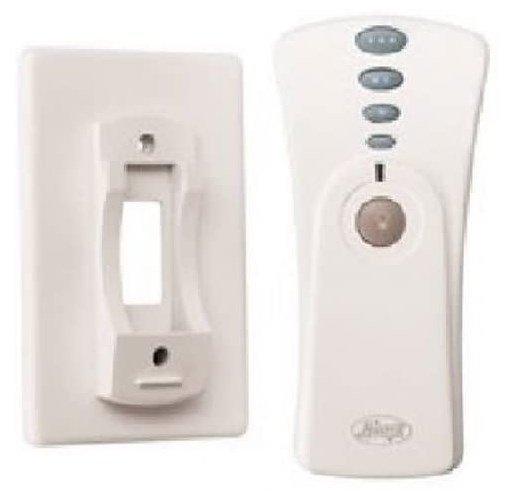
2. Key Features of the Hunter 99119 Ceiling Fan and Light Universal Remote Control
The Hunter 99119 universal remote brings a wealth of features designed to enhance the user experience and improve overall fan and light control. Below are some of the top features that make this remote a must-have for your Hunter ceiling fan.
Contemporary Design
One of the standout features of the Hunter 99119 remote is its sleek and modern design. With a white and satin nickel finish, it complements a wide range of home interiors, whether you’re styling your living room, bedroom, or office space. The compact size (4 x 2.5 x 1 inches) ensures it’s comfortable to hold, and it’s small enough to fit into any remote holder or drawer.
Multi-Speed Control
The Hunter 99119 remote allows you to adjust the fan speed with three separate buttons. Whether you need a gentle breeze or full air circulation, the multi-speed functionality ensures that you can customize the airflow to your ideal comfort level. The speed control is quick and simple, making it easy to find the right setting with a press of a button.
Full-Range Light Operation
In addition to controlling the fan, the Hunter 99119 remote also controls the light. The full-range light dimming feature allows you to adjust the brightness of your ceiling fan light kit for different moods and settings. This makes it perfect for reading, entertaining, or creating a relaxed ambiance in any room. Whether you want to brighten up your living space or lower the lights for a cozy atmosphere, the Hunter 99119 remote provides full control over the lighting.
Instant On/Off Button
The instant on/off button is an incredibly convenient feature, allowing you to quickly turn the fan or light on or off without needing to adjust the speed or light settings. It’s perfect for times when you need to adjust your room temperature or lighting instantly, like when entering or leaving the room.
Compatibility with All Ceiling Fans
The Hunter 99119 remote is universal, which means it works with all ceiling fan brands, as long as the receiver fits in the fan’s canopy. This broad compatibility allows you to easily replace or upgrade your existing remote without worrying about brand limitations.
Frequency Range
The Hunter 99119 remote is designed to work with ceiling fans installed at ceiling heights of 9 feet or greater. This makes it suitable for most standard and large rooms in your home. Whether you have a high ceiling in your living room or a standard height in your bedroom, this remote will provide efficient control over your fan.
3. Why Choose the Hunter 99119 Universal Remote Control?
Ease of Use
The Hunter 99119 remote is designed with user-friendliness in mind. Unlike complicated controls or systems, this remote control offers a simple, intuitive interface. With just a few buttons to control the fan speed, lighting, and fan direction, you won’t have to fumble with confusing settings.
Enhanced Comfort and Convenience
By switching to a Hunter 99119 remote, you can control the fan and light settings without ever leaving your seat. This convenience allows you to adjust the temperature and lighting levels at a moment’s notice, giving you more control over your home environment. Whether you’re in bed, on the couch, or at your desk, the Hunter 99119 remote provides instant access to fan and light control.
Perfect for Modern Homes
The modern design of the Hunter 99119 remote makes it a perfect addition to any contemporary or modern home. Its simple design, combined with the functional features, makes it an essential gadget for smart homes. Its ability to adjust the fan speed and light dimming with ease makes it the ideal companion for Hunter ceiling fans in living rooms, bedrooms, and even larger rooms with high ceilings.
4. Installation of the Hunter 99119 Universal Remote Control
Installing the Hunter 99119 remote is a quick and easy process, even for beginners. Here’s how you can set it up:
Step 1: Turn Off the Power
Before beginning the installation, turn off the power to your ceiling fan by flipping the switch on the wall or turning off the circuit breaker.
Step 2: Install the Receiver
- Open the ceiling fan canopy and attach the receiver that comes with the Hunter 99119 remote to the fan’s wiring. The receiver should fit snugly inside the canopy of your fan.
- Ensure the wires are connected correctly. If you’re not sure, consult the manual that comes with the remote or seek assistance from a professional electrician.
Step 3: Install the Remote Control Wall Plate
The Hunter 99119 remote also comes with a wall switch access plate. This can be installed next to your light switch for easy access.
Step 4: Pair the Remote and Receiver
Once the receiver is installed and wired, follow the instructions provided in the manual to sync the remote to the fan. This usually involves pressing and holding a button on the remote to pair it with the fan’s receiver.
Once paired, you can begin using the Hunter 99119 remote to control your fan and lighting.
Buy Hunter 99119 Ceiling Fan Remote Control on Amazon – Affiliate Link
5. Troubleshooting Common Issues with the Hunter 99119 Ceiling Fan Remote Control
Like any technology, you might occasionally encounter problems with your Hunter 99119 remote control. Fortunately, most issues can be resolved easily without needing professional help. Below are some common issues with the Hunter 99119 ceiling fan remote control and how to fix them.
1. Remote Not Pairing with the Fan
If your Hunter 99119 remote is not pairing with your ceiling fan, it can be due to several reasons. Here’s how to troubleshoot:
- Ensure Power is On: Make sure the power to the ceiling fan is on. Check the wall switch or circuit breaker to ensure the fan is powered.
- Check Battery: Replace the batteries in your remote. Weak batteries are often the culprit when the remote fails to sync.
- Reset the Pairing Process:
- Turn off the power to the fan for about 10 seconds to reset it.
- After turning the power back on, follow the pairing instructions provided in the manual to re-sync the remote with the fan.
If this doesn’t resolve the issue, contact Hunter customer support for further assistance.
2. Fan Speed or Light Controls Not Responding
If your Hunter fan speed or light control is not responding, the issue could be related to syncing or wiring.
- Check Remote and Receiver Sync: If the fan speed or light control is not responding, ensure that the remote and receiver are properly synced. Reset the pairing process and test again.
- Wiring Issues: Check the wiring inside the fan to ensure that all connections are secure. If you notice any loose wires, it’s best to call a professional to inspect and correct the wiring.
- Test the Fan Without Remote: Try adjusting the fan speed and light settings manually to confirm that the fan is working correctly. If it does work manually, the problem may lie with the remote.
3. Light Not Turning On or Dimming
Sometimes, the light dimming function may not work or the light kit won’t turn on at all. Here’s how to address the issue:
- Check Bulb Compatibility: Ensure that the light bulbs you’re using are compatible with the Hunter 99119 remote. If the bulbs are too powerful or incompatible, they may not function properly.
- Reset the Light Settings: If the light is not dimming correctly, try resetting the remote settings by following the pairing process again. This might reset the light dimming function.
- Examine the Light Fixture: Inspect the light fixture for any visible damage or loose connections. If the fixture is damaged, replacing it may be necessary.
4. Remote Control Not Responding to Fan Commands
If the Hunter 99119 remote is not responding to the fan commands (speed adjustment, light control), try these steps:
- Reset the Remote: Turn off the power to the fan for 30 seconds, and then turn it back on. After restoring power, try reprogramming the remote with the receiver.
- Battery Check: Make sure the remote’s batteries are working. Replace the batteries with new ones if needed.
- Check for Interference: Ensure that there is no interference between the remote and the fan receiver. Move any obstacles that may block the signal between the remote and receiver.
5. Fan or Light Won’t Turn Off
If your Hunter 99119 remote is not turning the fan or light off, the problem may stem from the settings or the remote itself.
- Check for Stuck Buttons: Sometimes, stuck buttons on the remote can cause the fan to remain on. Press each button individually to see if it resolves the issue.
- Power Cycle: Turn the power off at the wall switch for 10 seconds and turn it back on to reset the fan and remote.
- Factory Reset: If the issue persists, you may need to perform a factory reset on the remote and receiver. Refer to the manual for specific reset instructions.
If none of the above solutions work, it may be time to replace the remote or the receiver. You can also reach out to Hunter’s customer support for assistance.
6. Cost of the Hunter 99119 Ceiling Fan and Light Universal Remote Control
Understanding the cost of the Hunter 99119 remote control is important for making an informed purchasing decision. Here’s an overview of the average price range and other factors that affect the cost of the Hunter 99119 remote:
- Average Price Range: The Hunter 99119 ceiling fan remote control typically costs over $60, depending on where you purchase it and whether you buy from authorized retailers like Amazon or Hunter’s official website.
- Where to Buy: You can purchase the Hunter 99119 remote from various trusted retailers, including:
- Amazon: Often has competitive prices and quick shipping.
- Home Depot: Offers in-store and online purchasing with easy returns.
- Lowe’s: Another reliable option for Hunter parts and accessories.
- Affordability vs. Value: Considering the convenience and enhanced functionality that the Hunter 99119 remote provides, it’s a small price to pay for improved comfort and control over your ceiling fan and light settings.
Buy Hunter 99119 Ceiling Fan Remote on Amazon – Affiliate Link
7. Conclusion
The Hunter 99119 Ceiling Fan and Light Universal Remote Control is an essential accessory for Hunter ceiling fans and offers enhanced convenience, energy efficiency, and full control of your fan and light settings. With features like multi-speed control, light dimming, and compatibility with a wide range of fans, this remote ensures that you can create the perfect home environment with ease.
Whether you’re replacing an old remote or upgrading your fan control system, the Hunter 99119 remote is an excellent choice for modern homes seeking smarter, more convenient solutions.
If you’ve encountered issues with your Hunter 99119 remote, follow the troubleshooting steps above or consider contacting Hunter customer support for further help.
For those ready to enhance their ceiling fan experience, purchase the Hunter 99119 remote and enjoy unparalleled comfort and control at the push of a button.
Buy the Hunter 99119 Universal Remote Here – Affiliate Link
Leave a Reply