If you’re looking for the Hunter 85095 remote control manual, you’ve come to the right place. Whether you’re setting up a new Hunter ceiling fan remote, replacing an old remote, or troubleshooting issues, the manual provides all the information you need. In this guide, we’ll show you how to access the manual and explain how to install the Hunter 85095 remote control properly, along with troubleshooting tips and useful resources.
1. How to Find the Hunter 85095 Remote Control Manual
The Hunter 85095 remote control manual provides detailed instructions on installation, pairing, and troubleshooting. Here are the easiest ways to access the manual:
Option 1: Direct PDF Download
- The manual is available for direct download, you can access the PDF from the official sources where it’s hosted. Make sure to download it for easy access while setting up your Hunter 85095 remote.
Option 2: Online Search
- A simple Google search for “Hunter 85095 remote control manual” can lead you to a trusted source hosting the manual in PDF format. Many fan-related websites and product retailers provide downloadable copies of user manuals.
Option 3:
- For a comprehensive manual and additional installation instructions, you can refer to our Hunter Ceiling Fan Manuals page for more helpful documentation.
2. Understanding the Hunter 85095 Remote Control
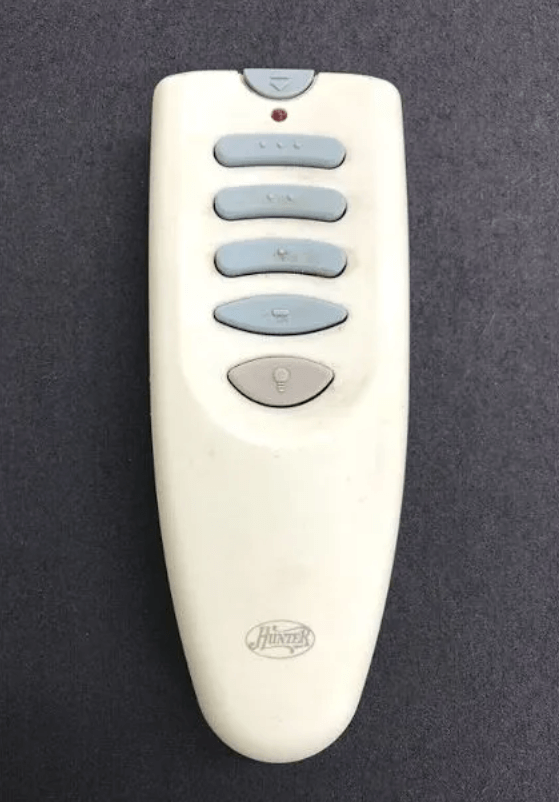
Before diving into installation or pairing, it’s important to familiarize yourself with the Hunter 85095 remote control. This remote provides multiple functions, including:
- Multi-speed control (low, medium, high).
- Light control with dimming capability.
- Fan direction control (reverse for winter or cooling mode for summer).
- Compatible with most Hunter ceiling fan models and designed to be easy to install.
Battery Information:
The Hunter 85095 remote operates with a 12V 23A battery, ensuring reliable operation when installed correctly.
3. How to Install Hunter 85095 Remote Control
For detailed installation instructions on how to set up your Hunter ceiling fan remote, please refer to our How to Install a Hunter Ceiling Fan Remote guide.
This step-by-step guide will help you understand the entire process, from removing the fan canopy to pairing the receiver with the remote.
4. How to Pair the Hunter 85095 Remote Control
Pairing the Hunter 85095 remote control with your ceiling fan is crucial for optimal fan operation. It enables you to control the fan’s speed, light, and direction using the remote.
You can follow the pairing instructions we’ve provided earlier in our Hunter Fan Remote 85095 Pairing Guide. This will provide you with a detailed, step-by-step guide to successfully pair the remote with the fan.
5. Troubleshooting Common Issues
If the Hunter 85095 remote control is not working as expected, here are a few common problems and solutions:
Remote Not Pairing
- Issue: The remote is not pairing with the receiver.
- Solution:
- Ensure the battery is fresh and installed correctly.
- Reset the remote by turning off the fan power, waiting for 10 seconds, and then restoring power.
- Check the dip switch settings to make sure they match between the receiver and the remote.
No Response from the Fan
- Issue: The fan doesn’t respond to the remote’s commands.
- Solution:
- Ensure the receiver is properly installed and connected to the fan motor.
- Confirm that the remote’s battery is working.
Fan Light Not Responding
- Issue: The light does not turn on or respond to dimming commands.
- Solution:
- Ensure the light bulb is installed correctly and is dimmable.
- Check the wiring to ensure that the receiver is properly controlling the light kit.
6. Additional Resources for Hunter Ceiling Fan Users
For more comprehensive troubleshooting and setup guides, you can explore these related articles:
- Hunter Ceiling Fan Manuals: For more manuals and guides.
- Hunter Ceiling Fan Remote Not Working: A detailed troubleshooting guide to help if your Hunter fan remote isn’t working as expected.
7. Conclusion
Installing and pairing the Hunter 85095 remote control is a straightforward process that enhances the functionality of your Hunter ceiling fan. By following the provided instructions, you can enjoy full control over your fan’s speed, light, and direction. If you encounter any issues, refer to the troubleshooting tips or check out the additional resources linked in this article.
For further help, feel free to go through the Hunter ceiling fans website article or check out other helpful articles on our website.
Leave a Reply