If your Hunter 99123 remote is unresponsive or acting erratically, it’s a common issue that often indicates a need for troubleshooting, re-pairing, or consulting its manual. This specific Hunter ceiling fan remote (model 99123) is a popular control unit, but like all electronics, it can encounter glitches. Rather than immediate replacement, understanding how to diagnose common problems, re-establish its connection with your fan, and access its manual for specific instructions can quickly restore full control over your ceiling fan and lighting.
Understanding Your Hunter 99123 Remote
The Hunter 99123 remote is designed for convenient control of your Hunter ceiling fan’s functions, typically including fan speed (low, medium, high), light control (on/off, dimming), and sometimes a fan off button. Its compact design and dedicated buttons aim for user-friendly operation. It’s crucial to understand that while the remote transmits signals, the fan’s receiver (located within the fan’s canopy at the ceiling) is what processes these commands. Issues often arise from a communication breakdown between these two components.
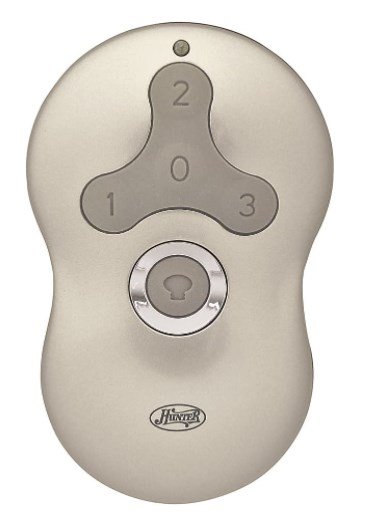
When Your Hunter 99123 Remote Isn’t Working: Troubleshooting First
Before considering a replacement for your hunter 99123 remote, it’s essential to troubleshoot common issues. Many problems that appear to be a dead remote can often be resolved with simple steps. This addresses concerns about your hunter fan remote 99123 not working.
- Check and Replace Batteries: This is the most frequent cause of remote malfunction.
- Open the battery compartment (usually on the back) of your hunter remote 99123.
- Remove the old A23 battery (a small, cylindrical 12V battery).
- Insert a fresh A23 battery, ensuring correct polarity. Even if you think the batteries are fresh, try a brand-new one to rule out a weak charge.
- Line of Sight and Obstructions:
- Ensure there are no physical obstructions between the remote and the fan. Large furniture, walls, or even certain types of glass can interfere with the signal.
- Move closer to the fan to test if range is an issue.
- Power Cycle the Fan: A simple power cycle can often clear minor communication glitches in the fan’s receiver.
- Turn off the power to your ceiling fan at the circuit breaker for at least 30 seconds.
- Turn the power back on.
- Immediately attempt to use the remote to see if it responds.
- Check for Interference: Other wireless devices in your home (e.g., Wi-Fi routers, smart home hubs, other ceiling fan remotes) can sometimes cause signal interference.
- Temporarily power off other nearby wireless devices to see if the hunter 99123 remote regains functionality.
- Perform a Remote Reset: For general remote issues, a reset can clear internal memory. While the 99123 typically doesn’t have a dedicated reset button, a battery removal and re-insertion (as done in step 1) often serves this purpose. For broader remote troubleshooting, you can refer to our guide on Hunter Fan Remote Reset.
How to Program (Pair) Your Hunter 99123 Remote
If troubleshooting doesn’t work, your hunter ceiling fan remote 99123 likely needs to be re-paired or programmed to your fan’s receiver. This process establishes a fresh, clear communication link.
- Ensure Power is OFF at the Breaker: Go to your home’s electrical panel and switch off the circuit breaker that controls the ceiling fan. Wait for at least 30 seconds to a full minute. This allows the fan’s receiver to fully discharge and reset.
- Restore Power to the Fan: Turn the circuit breaker back to the “ON” position.
- Initiate Pairing on the Remote: Within 60 seconds of restoring power to the fan, you must perform the pairing sequence on your hunter 99123 remote.
- Press and hold down both the “FAN” button and the “LIGHT” button simultaneously on the remote.
- Keep holding these buttons for approximately 3-5 seconds.
- The fan’s light should blink (if applicable), or the fan itself may give a slight “jerk” or response, indicating successful pairing.
- Test All Functions: Immediately test all buttons on your remote: fan on/off, speed changes (low, medium, high), and light on/off/dimming. If everything works, your remote is successfully programmed.
Expert Tip: Timing is critical! If the remote doesn’t pair on the first try, repeat the process from Step 1, ensuring you adhere strictly to the 60-second window after restoring power. Sometimes, it takes a couple of attempts. For more general programming advice, see our comprehensive guide on how to reprogram hunter fan remote.
Advanced Troubleshooting for Your Hunter 99123 Remote
If your hunter fan remote 99123 troubleshooting efforts haven’t yielded success, it’s time to dig a bit deeper.
- Check for Dip Switches (Rare for 99123 but Possible): While the 99123 primarily uses a ‘learn’ function, some Hunter fans, especially older models that might be retrofitted, could still have dip switches on the receiver inside the fan canopy.
- If your fan’s receiver has dip switches, ensure they are set to a pattern that does not conflict with any other fan in the vicinity. If you set them to a new, unique pattern, you would then follow the ‘Learn’ button programming method again.
- Receiver Malfunction: If the remote itself is proven to be working (e.g., by using it with another compatible fan, or if you’ve tried a new remote with the same fan and it also fails), the issue might lie with the fan’s receiver unit. A faulty receiver will prevent any remote from pairing. Replacing the receiver often requires professional help.
- Unpairing Conflicts: If you’re attempting to pair a new remote and an old one is causing interference, you might need to explicitly how to unpair hunter fan remote any existing connections before attempting to program the 99123.
Where to Find Your Hunter Fan Remote 99123 Manual
Having the correct hunter fan remote 99123 manual is an important document for specific instructions designed for your remote and fan model.
Download Your Manual Directly: For immediate access to the Hunter 99123 remote manual, you can download the PDF directly by clicking this link: Download Hunter 99123 Remote Manual (PDF).
For more general remote issues and troubleshooting common problems like your hunter fan remote 99123 not working, you can refer to our comprehensive guide: Hunter Ceiling Fan Remote Not Working.
When to Consider a Replacement Hunter 99123 Remote
After exhausting all troubleshooting and programming steps, if your hunter 99123 remote still fails to operate your fan, it might genuinely be time for a replacement. This is typically indicated if:
- You’ve confirmed new batteries, correct pairing attempts, and ruled out fan/receiver issues.
- The remote has visible physical damage (e.g., water damage, broken buttons, cracks).
- It functions intermittently or sends random commands.
When replacing, ensure you purchase an authentic Hunter 99123 replacement remote or a universally compatible remote specifically listed as working with Hunter fans that use the 99123 system.
Conclusion
Dealing with a hunter 99123 remote that isn’t cooperating can be frustrating, but with the right troubleshooting steps and programming knowledge, you can often restore full functionality. From a simple battery change to correctly performing the ‘learn’ button sequence, these methods empower you to keep your Hunter 99123 remote working seamlessly. Should you continue to face challenges, remember that Hunter offers excellent support, and their official manuals are a rich resource. For direct assistance, don’t hesitate to contact Hunter Ceiling Fans Customer Service.
Leave a Reply